As Amazon Associates, we earn from qualifying purchases. This means we may receive a small commission at no extra cost to you if you click through and make a purchase.
Traveling editors and mobile content creators frequently face the challenge of transitioning from compact laptop screens in transit to expansive, high-efficiency workstations at their base desks. Selecting an lg ultra wide monitor is one of the most effective ways to eliminate the clutter of multi-display arrays while expanding horizontal timeline space for video production, audio editing, and side-by-side asset management. The fundamental decision comes down to balancing display resolution, physical curvature, and dock-style single-cable utility, ensuring your portable machine charges rapidly while transmitting high-bitrate video and data through one port.
LG organizes its ultrawide lineup across distinct tiers, starting with flat-panel office workhorses, moving into color-accurate curved productivity displays, and topping out with ultra-high-resolution gaming and dual-mode production flagships. When conducting an lg ultrawide monitor comparison, mobile creators will notice that connectivity configurations differ significantly across the range, spanning standard display inputs to high-wattage USB-C hubs capable of pushing up to 96W of power back to a host notebook. Understanding how panel curvature, aspect ratios like 21:9 and 32:9, and integrated hub features align with your specific travel gear ensures you determine exactly which lg ultrawide monitor to buy for a clean, efficient desk footprint.
LG Ultrawide Monitors Lineup at a Glance
| Model | Screen Size & Resolution | Panel Type & Curve | USB-C Power Delivery | Refresh Rate |
|---|---|---|---|---|
| LG 34U530A-W | 34-inch WFHD (2560 x 1080) | Flat IPS | Display and data supported | 100Hz |
| LG 34WR55QK-B | 34-inch WQHD (3440 x 1440) | Curved VA | Up to 65W | 100Hz |
| LG 34U650A-B | 34-inch WQHD (3440 x 1440) | Curved 3800R IPS | Up to 96W | 100Hz |
| LG 45GX950A-B | 45-inch 5K2K WUHD (5120 x 2160) | Curved OLED | Up to 90W | 165Hz (330Hz Dual Mode) |
| LG 45GR75DC-B | 45-inch Dual QHD (5120 x 1440) | Curved VA (32:9) | Up to 90W | 200Hz |
| LG 34″ Curved UltraWide WQHD Smart | 34-inch WQHD (3440 x 1440) | Curved 1800R (unspecified panel) | Not specified in listing | 100Hz |
The Models in Detail
LG 34U530A-W 34-inch UltraWide WFHD
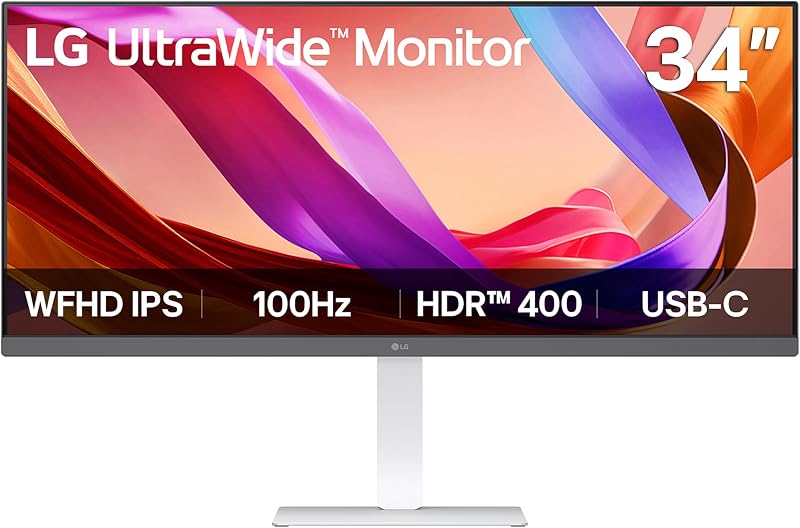
Best for: Budget multi-window office setups
Pros
- 100Hz IPS panel
- DisplayHDR 400 brightness
- Waves MaxxAudio speakers
Cons
- Lower 1080p vertical resolution
- Unspecified USB-C charging wattage
The LG 34U530A-W 34-inch UltraWide WFHD is designed for users who want to expand their desktop space without adding complex peripheral wiring. Featuring a 34-inch flat IPS panel with a 21:9 aspect ratio and a resolution of 2560 x 1080, this display provides wide horizontal viewing angles of 178 degrees and up to 99% sRGB color gamut coverage. The listing specifies a 100Hz refresh rate, a 1000:1 contrast ratio, and a brightness rating of 400 candela per square meter backed by VESA DisplayHDR 400 certification. Its physical setup includes an adjustable stand offering tilt, height, and swivel adjustments, while the clean white chassis appeals to users who appreciate bright desk aesthetics, similar to setups featuring a samsung monitor white styling.
For mobile editors and creators docking a laptop, the integrated USB Type-C port handles video output and data transfer through one cord, minimizing messy cabling across the desk. Audio monitoring is supported natively by built-in stereo speakers featuring Waves MaxxAudio processing, which reduces the necessity of packing external desktop speakers. Multitasking is further supported by the LG Switch app, which enables hotkey video call launching and window tiling into up to six discrete sections. Additionally, the monitor includes Reader Mode to warm color temperatures for extended reading sessions, alongside standard HDMI and DisplayPort inputs.
This model is best suited for administrative workers, document multitaskers, and entry-level media creators who need wide horizontal canvas space on a reliable flat screen. However, with its 1080p vertical resolution and a pixel pitch of 0.31, detailed video and photo retouching may feel restricted compared to higher-density alternatives. When more visual sharpness and dedicated laptop charging wattage are required, this display gives way to the higher-resolution WQHD models in LG’s lineup.
| Color | White |
|---|---|
| Dimensions | 9.1 x 32.1 x 21 Inches |
| Weight | 19.4 pounds |
Specifications and price are read from the Amazon product listing, not measured by this site. Open the listing
LG 34WR55QK-B 34-inch UltraWide WQHD

Best for: Curved spreadsheet and productivity workflows
Pros
- Sharp 3440×1440 resolution
- 65W USB-C power delivery
- High 3000:1 contrast ratio
Cons
- VA viewing angle shifts
- No built-in speakers listed
Bringing higher resolution and ergonomic wrap to productivity workstations, the LG 34WR55QK-B 34-inch UltraWide WQHD delivers a 3440 x 1440 canvas across an expansive 21:9 curved form factor. The listing states it features a VA panel with a 3000:1 contrast ratio, 300 cd brightness, and a 0.23 pixel pitch, producing noticeably crisper text and finer detail than 1080p displays. Color reproduction covers up to 99% of the sRGB gamut with HDR10 processing to enhance overall visual quality. A 100Hz refresh rate and a 5ms response time maintain smooth desktop navigation, reducing eye fatigue during intensive editing sessions.
Single-cable docking is a major highlight on this model, as the integrated USB Type-C port supplies up to 65W of power delivery while transmitting display signals and data simultaneously. The rear hub also includes two HDMI inputs, a DisplayPort, two USB downstream ports, and a dedicated headphone jack, allowing traveling creators to leave keyboard, mouse, and storage drives plugged directly into the monitor. Through LG OnScreen Control software, users can configure Picture-by-Picture to simultaneously view feeds from two distinct computer inputs, while Reader Mode dims blue light levels for evening productivity.
This curved lg ultrawide is ideal for spreadsheet-heavy professionals, data analysts, and video editors who need the sharp pixel structure of WQHD paired with high contrast for dark-room workflows. It gives way to the 34U650A-B when users operate power-hungry creative laptops that require more than 65W of charging capacity, or when color grading demands the broader viewing angles inherent to IPS panel engineering.
| Color | Black |
|---|---|
| Dimensions | 10.2 x 31.9 x 22.4 inches |
| Weight | 15.2 Pounds |
Specifications and price are read from the Amazon product listing, not measured by this site. Open the listing
LG 34U650A-B 34-inch UltraWide IPS WQHD

Best for: Mobile video editors needing heavy laptop power
Pros
- 96W USB-C laptop charging
- Color-consistent IPS panel
- Subtle 3800R ergonomic curve
Cons
- Moderate 300-nit brightness
- Standard 1000:1 contrast
The LG 34U650A-B 34-inch UltraWide IPS WQHD targets demanding content creators by pairing a curved 34-inch form factor with color-consistent IPS display technology. Featuring a subtle 3800R curvature designed to match natural human eye paths, the screen delivers a 3440 x 1440 resolution at a smooth 100Hz refresh rate and 5ms response time. The listing specifies 300 candela per square meter brightness, a 1000:1 contrast ratio, and up to 99% sRGB color gamut coverage with HDR10 enhancement, ensuring color fidelity remains stable even from off-center viewing angles.
For travel-heavy video and multimedia editors relying on power-hungry workstations, this display serves as an exceptional lg ultrawide usb-c monitor hub. Its USB-C interface provides an impressive 96W of laptop charging capacity alongside high-bandwidth display output and data transfer, easily keeping high-end creative notebooks running at peak performance without unpacking a bulky proprietary charging brick. Desk clutter is further reduced through integrated DepthSound stereo speakers with enhanced bass response, DisplayPort and HDMI inputs, and screen partitioning capabilities via the LG Switch app.
This model stands out as the best lg ultrawide monitor for mobile creative pros who require reliable IPS color rendering alongside heavy laptop charging wattage from a single cable. However, professionals requiring extreme pixel densities for fine 4K timeline rendering or ultra-high refresh rates for esports transitions may find it gives way to the larger 45-inch UltraGear models.
| Color | Black |
|---|---|
| Size | 34 |
| Dimensions | 9.1 x 32.2 x 21.1 inches |
1 more published attribute
| Weight | 22.3 pounds |
|---|
Specifications and price are read from the Amazon product listing, not measured by this site. Open the listing
LG 45GX950A-B 45-inch Ultragear 5K2K WUHD

Best for: High-end content creation and hybrid gaming
Pros
- 5K2K WUHD OLED resolution
- Dual-mode up to 330Hz
- DisplayPort 2.1 and 90W USB-C
Cons
- Substantial desktop footprint required
- Lower 275 cd typical brightness
The LG 45GX950A-B 45-inch Ultragear 5K2K WUHD stands at the cutting edge of ultrawide technology as a massive 45-inch curved OLED flagship offering a 5120 x 2160 WUHD resolution. Designed for creative specialists who might otherwise consider high-density displays like a dell 6k monitor, this unit achieves a fine 125 PPI density with an updated subpixel structure that eliminates color fringing along text edges. The listing highlights an astronomical 1,500,000:1 contrast ratio, typical 275 cd brightness with up to 1300 nits peak output, 98.5% DCI-P3 color gamut coverage, and VESA DisplayHDR True Black 400 certification for unparalleled shadow accuracy.
Performance flexibility is anchored by LG’s Dual Mode functionality, which allows users to switch between pristine 5K2K resolution at 165Hz and lightning-fast Wide Full HD at 330Hz with a hotkey command. Connectivity is equally forward-looking, incorporating cutting-edge DisplayPort 2.1, HDMI, and a USB Type-C connection delivering up to 90W of notebook charging. Visual responsiveness is virtually instantaneous thanks to a 0.03ms gray-to-gray response time, bolstered by AMD FreeSync Premium Pro and NVIDIA G-SYNC compatibility for tear-free video playback and gaming.
The 45GX950A-B is built specifically for high-end studio producers, motion graphics animators, and hybrid power users who demand flawless color grading and maximum resolution on a single screen. Because its massive curved profile and high-end OLED panel require a sturdy desktop allocation, it gives way to more compact 34-inch displays for mobile editors who maintain smaller temporary studio spaces.
| Color | Black |
|---|---|
| Size | 45 inch |
| Dimensions | 13.46 x 39.04 x 26.2 inches |
1 more published attribute
| Weight | 30.86 pounds |
|---|
Specifications and price are read from the Amazon product listing, not measured by this site. Open the listing
LG 45GR75DC-B Ultragear Curved Gaming Monitor
Best for: Dual-workstation operators needing super-ultrawide space
Pros
- Massive 32:9 dual QHD panel
- Fluid 200Hz refresh rate
- Built-in KVM with 90W USB-C
Cons
- Large desk footprint needed
- Narrower vertical FOV than 21:9
For creators seeking maximum horizontal workspace without the center seam of multi-display setups, the LG 45GR75DC-B Ultragear Curved Gaming Monitor offers an expansive 45-inch curved display in an extreme 32:9 super-ultrawide aspect ratio. Delivering a Dual QHD resolution of 5120 x 1440, it effectively replaces two side-by-side 1440p screens. The VA panel features a 3000:1 contrast ratio, 400 candela per square meter brightness, and VESA DisplayHDR 600 certification with 95% DCI-P3 color coverage. Editors comparing ultrawide ergonomics against alternative high-refresh displays, such as an asus curved gaming monitor, will appreciate the 200Hz refresh rate and 1ms GtG response time supported over HDMI 2.1, DisplayPort 1.4, and USB Type-C.
This display excels as an editing command center thanks to its integrated KVM switch, which allows users to control two separate computing systems using a single set of keyboard and mouse peripherals. Picture-in-Picture and Picture-by-Picture modes let editors cross-reference video feeds or run streaming tools simultaneously. Furthermore, the USB Type-C port provides up to 90W of power delivery to rapidly charge editing laptops, while DTS Headphone:X audio processing and customizable LED Hexagon backlighting complement the 3-way adjustable stand.
This super-ultrawide is best suited for timeline-heavy video editors, music producers needing dozens of mixer tracks visible at once, and multitaskers managing dual workstations simultaneously. However, its dramatic width demands a broad physical desk footprint, making it give way to standard 21:9 monitors like the 34U650A-B for creators with constrained surface space.
| Color | Black |
|---|---|
| Size | 45 Inch |
| Dimensions | 12.9 x 42.7 x 22 inches |
1 more published attribute
| Weight | 19.4 pounds |
|---|
Specifications and price are read from the Amazon product listing, not measured by this site. Open the listing
LG 34″ Curved UltraWide WQHD(3440×1440) Smart
Best for: Standalone entertainment and flexible desktop work
Pros
- Integrated webOS streaming platform
- Magic Remote voice control
- Sharp 1800R curved screen
Cons
- Listing omits panel tech type
- No USB-C delivery listed
Blending professional workspace dimensions with standalone entertainment features, the LG 34″ Curved UltraWide WQHD(3440×1440) Smart monitor functions as both a computer display and a media hub. It sports a 34-inch curved screen with an immersive 1800R radius, a 21:9 aspect ratio, and a sharp 3440 x 1440 WQHD resolution. The display supports HDR10, delivers up to 99% sRGB color gamut coverage, runs at a fluid 100Hz refresh rate, and features an anti-glare screen surface to suppress harsh studio reflections.
What sets this model apart from conventional computer monitors is the integration of LG webOS23, granting direct access to streaming platforms like Netflix, Prime Video, Apple TV, Disney+, and over 300 free LG Channels without requiring an attached computer. It includes an LG Magic Remote for intuitive interface navigation and voice commands, alongside wireless AirPlay 2 support for streaming content straight from Apple mobile devices. The adjustable stand allows easy positioning for both seated keyboard work and casual media watching.
This hybrid screen is tailored for mobile professionals living in compact apartments or studio rentals where one display must serve as both a productivity monitor and a primary television. It gives way to dedicated workstation models like the 34WR55QK-B and 34U650A-B when users require specialized wired USB-C power delivery hubs and hardware-level laptop docking.
| Color | Black |
|---|---|
| Size | 34 inch-100 |
| Dimensions | 14.5 x 31.9 x 22.4 Inches |
1 more published attribute
| Weight | 15.4 pounds |
|---|
Specifications and price are read from the Amazon product listing, not measured by this site. Open the listing
Matching a Model to Your Setup
- High-powered mobile editing rigs: The LG 34U650A-B provides color-accurate IPS viewing angles and a powerful 96W USB-C power delivery port, making it the premier single-cable hub for charging demanding creative laptops without carrying a separate power brick.
- Dual-computer workstations and long audio timelines: The LG 45GR75DC-B offers an ultra-wide 32:9 Dual QHD layout with an integrated KVM switch and Picture-by-Picture modes, letting multi-system editors manage two machines from one keyboard and mouse.
- Color-critical mastering and extreme detail work: The LG 45GX950A-B excels with its 5K2K WUHD OLED panel, 125 PPI text sharpness, and 98.5% DCI-P3 coverage, accommodating professionals who need uncompromised visual accuracy and Dual Mode speed versatility.
- Data-intensive spreadsheet and administrative desks: The LG 34WR55QK-B combines a crisp 3440 x 1440 curved screen with 65W USB-C charging and a high 3000:1 contrast ratio, delivering comfortable multi-window productivity for standard office workflows.
- Multi-functional studio apartments and bedroom workspaces: The LG 34″ Curved UltraWide WQHD Smart monitor serves as an all-in-one productivity screen and independent webOS entertainment center, controlled effortlessly via the included Magic Remote.
- Budget-conscious multi-window setups: The LG 34U530A-W supplies a spacious 21:9 flat IPS workspace with integrated stereo speakers and USB-C data connectivity, ideal for users who prioritize broad screen real estate over fine pixel density.
Before You Buy
When selecting an ultrawide monitor for a mobile workstation, examine the specific capabilities of the USB Type-C port on each model. While the LG 34U650A-B and LG 45GR75DC-B explicitly provide 96W and 90W of laptop charging respectively, the listing for the LG 34U530A-W notes USB Type-C display output and data transfer without specifying an exact wattage rating. Similarly, the listing for the LG 34-inch Smart monitor does not state any USB-C power delivery capacity, meaning creators relying on high-draw laptops must ensure their portable machine receives sufficient operating power or plan to pack their dedicated manufacturer charger.
Desk dimensions and mounting requirements also warrant careful verification before ordering. The large 45-inch models, including the 32:9 super-ultrawide LG 45GR75DC-B and the 5K2K OLED LG 45GX950A-B, occupy significant desk depth and horizontal clearance compared to standard 34-inch screens. Furthermore, the listing for the LG 34-inch Smart monitor does not specify whether its internal display panel uses IPS or VA technology, nor does it list response times. Verifying your available workspace dimensions, panel preferences, and exact peripheral needs will ensure a seamless integration into your mobile editing workflow.
FAQ
Which LG ultrawide monitor is best for single-cable laptop charging?
The LG 34U650A-B delivers the highest charging capacity among the compared models, offering up to 96W of USB-C power delivery. This allows traveling creators to run and recharge high-performance laptops over a single cable while transmitting video and data. The LG 45GX950A-B and LG 45GR75DC-B also provide robust charging capabilities with up to 90W of power delivery.
What is the difference between WFHD, WQHD, and 5K2K resolutions on an LG ultrawide?
WFHD offers 2560 x 1080 pixels, providing basic horizontal expansion across a 21:9 aspect ratio with a coarser pixel pitch. WQHD increases sharpness to 3440 x 1440 pixels, delivering crisper typography and more usable timeline room. The 5K2K WUHD resolution found on the LG 45GX950A-B pushes visual clarity even further to 5120 x 2160 pixels, offering 125 PPI density for precision editing without color fringing.
Can an LG ultrawide monitor display inputs from two separate computers at once?
Yes, models like the LG 34WR55QK-B and the LG 45GR75DC-B feature Picture-by-Picture functionality through LG OnScreen Control. The 45GR75DC-B also incorporates a built-in KVM switch, enabling creators to toggle control between two connected computers using a single mouse and keyboard setup.
Does the LG 34-inch Smart monitor require a computer to stream video?
No, the LG 34-inch Curved UltraWide Smart monitor features integrated webOS23, allowing standalone streaming via platforms like Netflix, Prime Video, Disney+, and LG Channels. It functions independently of a PC using the included Magic Remote and supports wireless streaming from mobile devices through Apple AirPlay 2.
What advantages do curved screens offer over flat ultrawide monitors?
A curved screen, such as the 3800R curve on the LG 34U650A-B or the 1800R curve on the Smart monitor, bends the outer edges toward your natural field of view. This design reduces head turning and maintains a more consistent viewing distance from your eyes to the edges of the display, minimizing eye fatigue during long editing sessions.
Creators balancing culinary content production with timeline editing benefit from keeping physical utility zones distinct yet visible. Positioning an ultrawide screen within direct sightlines of your food prep counter lets you monitor live capture streams without encroaching on a dedicated Stand Mixer Hub. This layout protects sensitive hardware from kitchen spills while keeping expanded timelines fully accessible.
Pairing a laptop with the right display simplifies mobile production workflows and cuts desk cable clutter significantly. For deeper dives into multi-device configurations and port management, exploring our dedicated Ultrawide Monitor Hub provides comprehensive setup tips to maximize portable performance. Selecting the right panel ultimately ensures seamless transitions between on-the-go shooting and studio editing.
Side by side
The 6 models above, lined up on the attributes that every one of them publishes, plus the score and listed price for all of them. Scores are out of 10, based on listed specifications and buyer feedback.
| Attribute | 01 34U530A-W 34-inch UltraWide WFHD | 02 34WR55QK-B 34-inch UltraWide WQHD | 03 34U650A-B 34-inch UltraWide IPS WQHD | 04 45GX950A-B 45-inch Ultragear 5K2K WUHD | 05 45GR75DC-B Ultragear Curved Gaming Monitor | 06 34" Curved UltraWide WQHD(3440×1440) Smart |
|---|---|---|---|---|---|---|
| Our scoreout of 10 | 8.6/10 | 9.0/10 | 9.6/10 | 8.4/10 | 8.4/10 | 9.2/10 |
| Color | White | Black | Black | Black | Black | Black |
| Dimensions | 9.1 x 32.1 x 21 Inches | 10.2 x 31.9 x 22.4 inches | 9.1 x 32.2 x 21.1 inches | 13.46 x 39.04 x 26.2 inches | 12.9 x 42.7 x 22 inches | 14.5 x 31.9 x 22.4 Inches |
| Weight | 19.4 pounds | 15.2 Pounds | 22.3 pounds | 30.86 pounds | 19.4 pounds | 15.4 pounds |
Attributes that only some of the models publish are left out of this table; they stay in each model’s own spec sheet above.