As Amazon Associates, we earn from qualifying purchases. This means we may receive a small commission at no extra cost to you if you click through and make a purchase.
Evaluating a curved display for high-detail creative production requires balancing screen real estate, pixel sharpness, and the physical limitations of your workspace. Creators, traveling professionals, and digital artists frequently deliberate over whether a dedicated samsung 4k curved monitor fits their editing workflow without monopolizing a compact workstation. Curved screens improve peripheral visibility and immersion by maintaining uniform focal distances across broad viewing angles. However, choosing the wrong size or aspect ratio can crowd your working surface or fail to provide enough visual canvas for multitrack timelines, colour palettes, and multiple application windows. Selecting the ideal panel means weighing resolution against desk depth and screen curvature.
This comprehensive samsung curved monitor comparison analyzes how the manufacturer segments its curved display lineup to help you determine which samsung curved monitor to buy. Samsung organizes its curved catalog into distinct tiers, ranging from ultra-wide flagship Odyssey gaming displays equipped with advanced backlighting and massive horizontal spans down to streamlined, budget-conscious daily productivity screens. These displays diverge significantly in curvature radius, panel technologies, refresh rates, and pixel densities. Whether your work demands true ultra-high definition, cinematic 21:9 ultrawide canvas space, or a compact 16:9 footprint that fits onto temporary editing desks, understanding the specifications of each model ensures your investment matches your creative production requirements.
Samsung Curved Monitor Lineup at a Glance
| Model | Screen Size & Curvature | Resolution & Aspect Ratio | Refresh Rate & Panel Tech |
|---|---|---|---|
| Samsung 37” Odyssey G7 | 37 inches, 1000R | 4K UHD (3840 x 2160), 16:9 | 165Hz, VA LED |
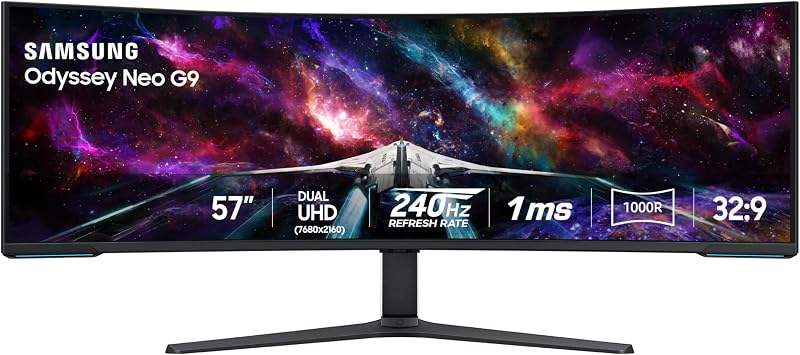
| Samsung 57″ Odyssey Neo G9 | 57 inches, 1000R | Dual UHD (7680 x 2160), 32:9 | 240Hz, Quantum Mini LED VA |
| Samsung 40” Odyssey G7 | 40 inches, 1000R | WUHD Ultrawide 4K, 21:9 | 180Hz, VA LED |
| Samsung 34′ Odyssey G5 Ultra-Wide Gaming | 34 inches, 1000R | WQHD (3440 x 1440), 21:9 | 165Hz, VA |
| Samsung 32″ Odyssey | 32 inches, 1000R | QHD (2560 x 1440), 16:9 | 165Hz, LED |
| Samsung 32″ S3 | 32 inches, 1800R | FHD (1920 x 1080), 16:9 | 100Hz, VA |
The Models in Detail
Samsung 37” Odyssey G7

Best for: Creative professionals needing sharp 4K color fidelity
Pros
- Crisp 4K UHD resolution
- DisplayHDR 600 contrast
- Smooth 165Hz refresh rate
Cons
- Bulky 37-inch desk footprint
The Samsung 37” Odyssey G7 is designed for creators and gamers who require true 4K UHD resolution within a traditional 16:9 aspect ratio. Featuring an expansive 37-inch VA LED panel, this monitor delivers crisp visual clarity backed by a pixel pitch of 0.21 and a 99 percent color gamut. The 1000R curvature conforms closely to the human field of view, pulling the screen edges inward to minimize head turning while reviewing high-resolution imagery. Visual contrast is particularly strong, rated at 3000:1, and supported by VESA DisplayHDR 600, which yields deep blacks and brighter whites for precise image evaluation even in dimly lit scenes.
Performance capabilities on the Samsung 37 Odyssey G7 extend well into high-speed creative workflows and competitive play. It features a 165Hz refresh rate paired with a near-instant 1ms gray-to-gray response time, effectively eliminating trailing and motion blur when scrubbing video sequences. Display brightness measures 350 cd/m2, providing reliable illumination across daylight conditions. Adaptive performance is managed through AMD FreeSync Premium Pro, synchronizing panel output with your graphics hardware to prevent screen tearing and input stutter. Additionally, Auto Source Switch+ automatically detects and transitions to active input sources as connected external devices power up.
This model suits visual editors and digital media producers who demand sharp 4K precision on a large 16:9 canvas without moving into extreme ultrawide dimensions. It provides generous vertical space for preview windows and stacked application toolbars. However, if your workstation requires horizontal timeline stretching across multiple video tracks, the Samsung 37” Odyssey G7 gives way to the ultrawide format of the 40-inch Odyssey G7, which adds panoramic width for editing complex multi-panel timelines.
| Color | Black |
|---|---|
| Size | 37-inch |
| Dimensions | 12 x 32.1 x 26.6 inches |
1 more published attribute
| Weight | 24.7 Pounds |
|---|
Specifications and price are read from the Amazon product listing, not measured by this site. Open the listing
Samsung 57″ Odyssey Neo G9
Best for: Power users replacing multiple large desktop displays
Pros
- Massive Dual UHD 57-inch screen
- 2392 local dimming zones
- Fast 240Hz refresh rate
Cons
- Requires massive dedicated desk space
The massive Samsung 57″ Odyssey Neo G9 stands as the world’s first Dual UHD monitor, packing a staggering 32:9 aspect ratio that equals two standard 4K UHD monitors placed side by side. Driven by proprietary Quantum Matrix Technology and Quantum Mini LEDs, this 57-inch display features 2,392 individual local dimming zones and 12-bit black levels. The matte-finished VA display achieves an extraordinary contrast ratio of 1,000,000:1 alongside VESA DisplayHDR 1000, delivering up to 1,000 nits of peak brightness and a standard brightness of 420 cd/m2. Its 0.18 pixel pitch and 99 percent color gamut ensure pristine image definition across every inch of its sweeping canvas.
High-speed fidelity is central to the Samsung 57 Odyssey Neo G9, which delivers a blistering 240Hz refresh rate and a 1ms gray-to-gray response time. Connectivity is modern and robust, including next-generation DisplayPort 2.1 input alongside HDMI 2.1 and an integrated USB hub to link multiple workstation peripherals without cord clutter. For gamers and video colorists operating a high-end samsung 240hz monitor, the display leverages AMD FreeSync Premium Pro to render fast-moving sequences smoothly. Environmental aesthetics are enhanced by CoreSync and Core Lighting+, which project on-screen color palettes onto the surrounding wall behind the monitor.
This monumental display is tailored for power users, simulation enthusiasts, and video editors seeking an uncompromising desktop replacement that eliminates multi-monitor bezel interruptions. It accommodates simultaneous full-screen editing suites, mixer panels, and source folders on a single continuous 1000R curve. However, its immense physical dimensions demand an exceptionally deep and sturdy desk. If your workspace lacks the surface area needed to support a 57-inch frame, this model gives way to the more manageable footprint of the 40-inch Odyssey G7.
| Color | Black & White |
|---|---|
| Size | 57-inch |
| Dimensions | 19.7 x 52.3 x 24 Inches |
1 more published attribute
| Weight | 41.9 pounds |
|---|
Specifications and price are read from the Amazon product listing, not measured by this site. Open the listing
Samsung 40” Odyssey G7

Best for: Video editors wanting expansive timeline workspace
Pros
- Ultrawide 21:9 WUHD resolution
- Fluid 180Hz refresh rate
- Deep 3000:1 contrast ratio
Cons
- Substantial 36-inch physical width
The Samsung 40” Odyssey G7 bridges the gap between massive super-ultrawides and standard 16:9 displays by offering a 21:9 ultrawide aspect ratio in brilliant WUHD resolution. Spanning 40 inches with a deep 1000R curve, this display wraps your field of vision to create an immersive, panoramic creative suite. The VA panel features a static contrast ratio of 3000:1, a 0.99 color gamut, and 350 cd/m2 brightness. VESA DisplayHDR 600 certification ensures that dark shadow details and highlighted midtones remain distinct, allowing colorists and video producers to scrutinize visual elements accurately.
Motion clarity and productivity tools are prominent throughout the Samsung 40 Odyssey G7. A swift 180Hz refresh rate and 1ms gray-to-gray response time maintain sharp, stutter-free playback across fast-paced gaming and timeline editing. Seamless frame rendering is backed by AMD FreeSync Premium Pro, keeping the GPU and display in sync. To maximize workspace utility, Picture-by-Picture capability allows users to display inputs from two distinct source devices side by side. The unit measures 11.96 inches deep, 36.56 inches wide, and 23.58 inches high, maintaining a stable desktop presence.
This model suits digital audio workstation engineers and professional video editors who need horizontal timeline extension without giving up vertical clarity. As a high-performance samsung ultrawide curved monitor, it organizes complex project layouts effortlessly. When desk width is strictly limited, however, the 40-inch footprint may still overpower smaller furniture, at which point it gives way to the narrower 34-inch Odyssey G5.
| Color | Black |
|---|---|
| Size | 40-inch |
| Dimensions | 11.96 x 36.56 x 23.58 inches |
1 more published attribute
| Weight | 24.9 pounds |
|---|
Specifications and price are read from the Amazon product listing, not measured by this site. Open the listing
Samsung 34′ Odyssey G5 Ultra-Wide Gaming

Best for: Multitaskers seeking ultrawide view on smaller desks
Pros
- Wrap-around 1000R curved immersion
- Ultrawide WQHD 1440p resolution
- Responsive 165Hz refresh rate
Cons
- Lower vertical pixel count than 4K
The Samsung 34′ Odyssey G5 Ultra-Wide Gaming monitor delivers an engaging 21:9 widescreen canvas in a form factor that fits comfortably on moderate desk surfaces. Built with an ultrawide WQHD resolution of 3440 x 1440, this 34-inch VA monitor provides broad horizontal territory that matches the human field of view through an all-encompassing 1000R curvature. The curved screen brings edges comfortably into peripheral view, mitigating neck fatigue during extended working hours. HDR10 support enhances color expression, rendering shadow depth and bright highlights faithful to source material.
Responsive performance on the Samsung 34 Odyssey G5 is highlighted by a 165Hz refresh rate and a rapid 1ms motion picture response time. Screen tearing and frame stuttering are minimized using AMD FreeSync Premium, which incorporates low framerate compensation to ensure continuous image stability during dynamic scenes. Unlike massive super-ultrawide panels such as a samsung 49 inch curved monitor, this 34-inch chassis strikes a practical balance between extended timeline capacity and a desk-friendly physical outline.
This display is an excellent match for multimedia creators and remote professionals who want the productivity advantages of an ultrawide format without dedicating an entire room to their setup. It offers ample space for side-by-side browser windows, document drafts, and editing tools. When high-resolution 4K asset verification or extreme color grading precision is mandatory, this model gives way to the higher pixel density of the 37-inch Odyssey G7.
| Aspect Ratio | 21:9 |
|---|---|
| Screen Finish | Curved |
| Contrast Ratio | 1900-04-13T04:01:00.000Z |
34 more published attributes
| Refresh Rate | 165 hertz |
|---|---|
| Display Type | LCD |
| Display Technology | VA |
| Viewing Angle | 178 degrees |
| Brightness | 250 cd/m2 |
| Color Gamut | 72 |
| Picture Quality Enhancement Technology | [INFERRED: Multiple picture quality enhancement technologies, including HDR10 and VA panel] |
| Screen Size | 34 inches |
| Item Dimensions D x W x H | 10.73"D x 31.76"W x 18.71"H |
| Item Weight | 12.3 pounds |
| Resolution | QHD Wide 1440p |
| Display Resolution Maximum | 3440 x 1440 pixels |
| Native Resolution | 3440×1440 |
| Power Consumption | 50 watts |
| Voltage | 110 volts |
| Connectivity Technology | wired |
| Hardware Connectivity | 3.5mm Audio, DisplayPort, HDMI |
| Adaptive Sync | FreeSync |
| Additional Features | Adaptive Sync, Curved, Eye Care, High Dynamic Range, Wall-Mount |
| Specific Uses For Product | Gaming |
| Color | BLACK |
| Mounting Type | Desk Mount |
| Shape | Curved |
| Brand | Samsung |
| Model Number | LC34G55TWWNXZA |
| Model Name | FBASAMLC34G55TWWNXZA |
| Warranty Description | 1 Year Manufacturer |
| Included Components | Manual |
| Item Type Name | Monitor |
| Response Time | 1 milliseconds |
| Total Number of HDMI Ports | 1 |
| Total Usb Ports | 1 |
| Number of Component Outputs | 1 |
| Screen Surface Description | Curved |
Specifications and price are read from the Amazon product listing, not measured by this site. Open the listing
Samsung 32″ Odyssey
Best for: Everyday creators balancing desk space and clarity
Pros
- Sharp QHD pixel density
- Tight 1000R curvature
- Smooth 165Hz motion clarity
Cons
- Glossy screen finish reflects glare
The Samsung 32″ Odyssey brings immersive 1000R curvature to a versatile 16:9 form factor. Providing QHD resolution with 1.7 times the pixel density of standard Full HD, this 32-inch LED monitor offers sharp detail for office tasks, creative drafts, and gaming. The screen features a glossy finish that emphasizes visual clarity, a 2500:1 contrast ratio, and a brightness rating of 300 cd/m2. Supported by HDR10 processing and a 0.99 color gamut, it displays luminous highlights and deep shadow tones across digital media.
Under the hood, the Samsung 32 Odyssey features a 165Hz refresh rate alongside a 1ms MPRT response time to eliminate motion blur during rapid scene transitions. AMD Radeon FreeSync maintains seamless synchronization between your graphics processor and the panel, preventing screen tearing during media playback and interactive workflows. Eye comfort is prioritized through Eye Saver Mode, which lowers blue light emissions, alongside flicker-free technology designed to minimize visual strain over long editing sessions. The display operates at a 0.27 pixel pitch with wide 178-degree viewing angles.
This model is best suited for budget-conscious creators, students, and home office workers who want a high-refresh QHD screen with an intense curve for standard desk depths. It delivers significantly greater sharpness than basic 1080p monitors. However, for users whose primary goal is basic office utility with integrated sound, the Odyssey G5 gives way to the Samsung 32″ S3, which incorporates built-in speakers and a milder curve.
| Color | Black |
|---|---|
| Size | 32-inch |
| Dimensions | 10.7 x 28 x 21.01 inches |
1 more published attribute
| Weight | 11.5 pounds |
|---|
Specifications and price are read from the Amazon product listing, not measured by this site. Open the listing
Samsung 32″ S3
Best for: Basic productivity on tighter desk spaces
Pros
- Integrated built-in stereo speakers
- Gentle 1800R curvature
- TUV-certified eye comfort mode
Cons
- Standard 1080p Full HD resolution
The Samsung 32″ S3 is a dedicated productivity and multimedia display tailored for streamlined, clutter-free desk environments. Featuring a 32-inch Full HD VA panel with a 16:9 aspect ratio, it incorporates a gentle 1800R curve designed to widen your viewing field and enhance depth perception while reducing peripheral distractions. The screen is finished with a matte coating that reduces reflection under ambient office lighting, supported by a 3000:1 static contrast ratio, 250 cd/m2 brightness, and a 0.95 color gamut.
Operating at a 100Hz refresh rate, the Samsung 32 S3 reduces lag and blur when navigating creative software, streaming video, or engaging in casual gaming. Built-in stereo speakers eliminate the necessity of buying external desktop audio equipment, freeing up valuable desk area. Ergonomic viewing is certified by TÜV, with advanced eye comfort features including Eye Saver Mode to reduce blue light exposure and eliminate annoying screen flicker. Compact dimensions of 10.3 inches deep, 28.2 inches wide, and 20.7 inches high make it easy to position on modest workstations, much like a compact samsung 24 inch curved monitor setup.
This monitor suits everyday telecommuters, students, and administrative professionals who need a spacious screen for documents, video conferences, and general computing without extra audio hardware. However, because its resolution is limited to 1920 x 1080 across a 32-inch panel, pixel density is relatively low. For demanding photo editing, fine vector graphic illustration, or high-definition video production, this model gives way to the sharper QHD or 4K Odyssey panels.
| Color | Black |
|---|---|
| Size | 32 inch |
| Dimensions | 10.3 x 28.2 x 20.7 inches |
Specifications and price are read from the Amazon product listing, not measured by this site. Open the listing
Matching a Model to Your Setup
- Dedicated 4K visual editing on standard desks: Choose the Samsung 37” Odyssey G7 for its crisp 3840 x 2160 resolution, DisplayHDR 600 contrast, and conventional 16:9 aspect ratio that preserves high vertical canvas height.
- Complete multi-monitor workstation replacement: Select the Samsung 57″ Odyssey Neo G9 if you have an extra-wide, heavy-duty desk and require the visual equivalent of dual 4K screens powered by Quantum Mini LED local dimming and DisplayPort 2.1.
- Horizontal timeline production and multitrack editing: Opt for the Samsung 40” Odyssey G7 to gain expansive 21:9 WUHD ultrawide workspace with Picture-by-Picture support for managing two separate workstation inputs simultaneously.
- Balanced ultrawide multitasking on moderate desks: Pick the Samsung 34′ Odyssey G5 Ultra-Wide Gaming monitor to enjoy seamless 21:9 WQHD workflow benefits without occupying excessive desk surface area.
- High-refresh everyday creative tasks on a 16:9 budget: Choose the Samsung 32″ Odyssey for sharp QHD pixel density, 165Hz fluidity, and deep 1000R curvature on standard home office tables.
- Clean minimalist setups needing integrated audio: Select the Samsung 32″ S3 to save workspace with built-in speakers, gentle 1800R curvature, and TÜV-certified eye comfort for daily business and productivity tasks.
Before You Buy
Before purchasing a curved display, consider the physical workspace requirements and equipment specifications that manufacturer listings do not explicitly detail. Samsung listings do not specify factory color calibration certificates or Delta-E accuracy reports for every individual unit, meaning colorists should plan on hardware profiling if exact print matching is required. Furthermore, listings for these models do not specify exact USB power delivery wattage across integrated hubs, so creators using USB-C or Thunderbolt laptops cannot rely on these screens to charge host computers without dedicated power supplies.
Workspace measurements require careful attention before finalizing your order. The product specifications provide exterior dimensions for certain models, such as the 40-inch G7 and 32-inch S3, but they do not detail the exact minimum desk depth required to maintain comfortable focal distance on deep 1000R curved stands. Additionally, package contents and cable lengths for DisplayPort or HDMI connections are not fully itemized across every regional retail bundle, so you may need to source heavy-duty VESA desk mounts or longer certified video cables to complete your workstation configuration.
FAQ
Which Samsung curved monitor provides true 4K resolution?
The Samsung 37” Odyssey G7 provides true 4K UHD resolution (3840 x 2160) in a standard 16:9 aspect ratio, while the 40” Odyssey G7 offers WUHD ultrawide resolution (5120 x 2160 class in 21:9). The flagship 57″ Odyssey Neo G9 doubles that horizontal fidelity by delivering Dual 4K UHD resolution across a 32:9 super-ultrawide panel.
How does a 1000R curve differ from an 1800R curve on a desk?
The number before the ‘R’ represents the radius of the circle the curve forms in millimeters. A 1000R curve has a tighter 1,000 mm radius, creating a pronounced curve that closely mirrors human peripheral vision for deep immersion. An 1800R curve has a broader 1,800 mm radius, producing a subtler curve that feels flatter and requires less desk depth.
Do these Samsung curved monitors support multiple device inputs at once?
The Samsung 40” Odyssey G7 explicitly lists Picture-by-Picture functionality, enabling users to display signals from two connected devices simultaneously. The 37” Odyssey G7 includes Auto Source Switch+ to detect new active connections, while the 57″ Odyssey Neo G9 offers multiple DisplayPort 2.1 and HDMI 2.1 inputs alongside an integrated USB hub.
Are built-in speakers included with every Samsung curved display?
No, built-in speakers are not standard across the entire lineup. Among the models evaluated, the Samsung 32″ S3 specifically advertises integrated speakers to save desk space. High-performance gaming and creative models like the Odyssey G7 and Odyssey Neo G9 focus on visual performance and omit integrated audio in favor of external audio setups.
What is the benefit of Quantum Mini LED technology on the 57″ Odyssey Neo G9?
Quantum Matrix Technology utilizes miniaturized Quantum Mini LEDs to manage 2,392 individual local dimming zones. This dense dimming grid allows precise control over backlighting, achieving extreme 12-bit black levels, a 1,000,000:1 contrast ratio, and peak brightness up to 1,000 nits under VESA DisplayHDR 1000 without washing out adjacent dark areas.
Side by side
The 6 models above, lined up on the attributes that every one of them publishes, plus the score and listed price for all of them. Scores are out of 10, based on listed specifications and buyer feedback.
| Attribute | 01 37” Odyssey G7 | 02 57" Odyssey Neo G9 | 03 40” Odyssey G7 | 04 34' Odyssey G5 Ultra-Wide Gaming | 05 32" Odyssey | 06 32" S3 |
|---|---|---|---|---|---|---|
| Our scoreout of 10 | 8.2/10 | 9.4/10 | 9.4/10 | 8.6/10 | 9.4/10 | 8.6/10 |
| Color | Black | Black & White | Black | BLACK | Black | Black |
Attributes that only some of the models publish are left out of this table; they stay in each model’s own spec sheet above.