As Amazon Associates, we earn from qualifying purchases. This means we may receive a small commission at no extra cost to you if you click through and make a purchase.
Choosing an lg 240 hz monitor requires balancing resolution targets, panel chemistry, physical desk real estate, and mobility constraints. Mobile creators, traveling media editors, and space-conscious workstation builders face distinct challenges when integrating an external high-refresh-rate display into temporary work areas or compact editing nooks. While a fast 240Hz refresh rate delivers fluid cursor movement, rapid timeline scrubbing, and responsive visual previews, panel specifications dictate how well a display fits your physical workspace. Shoppers must determine whether an esports-focused 1080p canvas fulfills rapid workflows, a 1440p resolution provides necessary pixel density for fine edits, or an ultrawide curved canvas replaces multi-monitor clutter on limited desks.
The LG UltraGear product lineup organizes neatly into three practical categories: high-velocity Full HD IPS screens, balanced QHD IPS and ultrawide VA panels, and premium QHD OLED displays. Understanding these distinct tiers simplifies deciding which lg 240hz monitor to buy based on priorities regarding chassis weight, pixel pitch, color gamut coverage, and pixel response speeds. While conventional IPS panels prioritize high sustained brightness and broad viewing angles, OLED variants deliver microsecond response times and deep contrast. By evaluating ergonomic adjustability, display coatings, and connectivity interfaces across this lg ultragear 240hz comparison, traveling creators and desk-bound users can pick the right display without wasting workspace or system resources.
LG 240Hz Monitors Lineup at a Glance
| Model | Display Size & Panel | Resolution | Key Ergonomics & Connectivity |
|---|---|---|---|
| LG 27G440A-B | 27-Inch IPS (Matte) | 1920 x 1080 (FHD) | Tilt, Height, Swivel, Pivot; HDMI 2.1, DisplayPort |
| LG 27GR83Q-B | 27-Inch IPS (Matte) | 2560 x 1440 (QHD) | Tilt, Height, Pivot; HDMI 2.1, DisplayPort 1.4 |
| LG 27GX704A-B | 27-Inch OLED (Glossy) | 2560 x 1440 (QHD) | Dual HDMI 2.1, DP 1.4, USB 3.2 Hub; Glossy Finish |
| LG 34G630A-B | 34-Inch Curved VA (Matte) | 3440 x 1440 (WQHD) | Tilt, Height, Swivel; USB Type-C PD 15W, Speakers |
| LG 27GP750-B | 27-Inch IPS (Matte) | 1920 x 1080 (FHD) | Tilt, Height, Pivot; 3-Side Virtually Borderless |
| LG 27GS93QE | 27-Inch OLED (Matte) | 2560 x 1440 (QHD) | Tilt, Height, Pivot; HDMI 2.1, DP, Anti-Glare Coating |
The Models in Detail
LG 27G440A-B 27-Inch Ultragear Full HD

Best for: Esports players needing high speed 1080p
Pros
- Smooth 240Hz refresh rate
- Full tilt height swivel pivot stand
- NVIDIA G-SYNC and FreeSync support
Cons
- Lower 1080p resolution at 27 inches
The LG 27G440A-B 27-Inch Ultragear Full HD provides a high-speed 1920 x 1080 canvas on a 27-inch IPS display. The listing specifies a 240Hz refresh rate and a 1ms GtG response time, preventing ghosting during fast motion. Color fidelity is maintained through HDR10 support and up to 99% sRGB coverage on a matte screen finish. Visual sync includes NVIDIA G-SYNC Compatibility and AMD FreeSync Premium for tear-free gaming.
Ergonomic flexibility suits mobile setups and temporary workstations. The stand offers tilt, height, swivel, and 90-degree pivot adjustability to configure the screen vertically. The unit measures 8.7 inches deep by 24.1 inches wide and weighs 14.3 pounds. Gaming features include Dynamic Action Sync to minimize input lag, Black Stabilizer for shadow visibility, and an on-screen Crosshair.
This model serves competitive esports players and remote creators running portable mid-tier laptops. With a pixel pitch of 0.31 mm, fine timeline elements appear softer than on higher-resolution monitors. Users needing sharper text and denser workspace give way to the 1440p resolution of the LG 27GR83Q-B.
| Color | Black |
|---|---|
| Dimensions | 8.7 x 24.1 x 21.3 inches |
| Weight | 14.33 Pounds |
Specifications and price are read from the Amazon product listing, not measured by this site. Open the listing
LG 27GR83Q-B 27-inch Ultragear QHD

Best for: Hybrid creators and competitive PC gamers
Pros
- Sharp QHD 1440p resolution
- HDMI 2.1 and DisplayPort 1.4 support
- 95 percent DCI-P3 color gamut
Cons
- Standard 1000 to 1 contrast ratio
Stepping up to a sharper pixel density, the LG 27GR83Q-B 27-inch Ultragear QHD features a 2560 x 1440 resolution on a 27-inch IPS panel. The listing notes that 240Hz speeds are supported across both DisplayPort 1.4 and HDMI 2.1 connections, making it versatile for connecting laptops and desktop rigs. In our lg 1440p monitor guide, 1440p panels represent the sweet spot between crisp image detail and manageable graphics processing demands.
The display supports up to 95% (typical) DCI-P3 color gamut coverage, paired with VESA DisplayHDR 400 certification, a 1000:1 contrast ratio, and 400 cd/m² brightness. A 0.23 mm pixel pitch keeps fine text crisp, while a 1ms GtG response time maintains motion clarity. The chassis features a 3-side borderless aesthetic with tilt, height, and pivot stand adjustments, along with a 4-pole headphone jack supporting DTS Headphone:X.
The lg 27gr83q-b is built for video editors and hybrid gamers requiring crisp rendering and wide color gamuts. It gives way to LG’s OLED alternatives when users prioritize infinite contrast ratios and near-instant response speeds over traditional matte IPS panels.
| Color | Black |
|---|---|
| Size | 240Hz-HDMI/DP |
| Dimensions | 10 x 24.2 x 22.7 Inches |
1 more published attribute
| Weight | 13.7 Pounds |
|---|
Specifications and price are read from the Amazon product listing, not measured by this site. Open the listing
LG 27GX704A-B 27-inch Ultragear QHD

Best for: Colorists and gamers in dim studios
Pros
- Ultra-fast 0.03ms response time
- Deep 1.5M to 1 OLED contrast
- Vibrant glossy screen finish
Cons
- Reflective surface in bright rooms
The LG 27GX704A-B 27-inch Ultragear QHD introduces self-lit pixel technology on a glossy 27-inch OLED panel. Running at 2560 x 1440 at 240Hz, it achieves an ultra-low 0.03ms response time. The screen delivers a 1,500,000:1 contrast ratio, DisplayHDR True Black 400, and a standard brightness of 275 cd/m² that peaks at 1300 nits. Covering up to 98.5% of the DCI-P3 color space, it produces deep blacks and vibrant highlights.
Viewing comfort is supported by three UL certifications covering Anti-Glare, Flicker-Free, and Low Blue Light operation. The monitor functions as a hub with dual HDMI 2.1 inputs, DisplayPort 1.4, a USB 3.2 upstream port, and two USB 3.2 downstream ports. Adaptive sync is provided by NVIDIA G-SYNC Compatibility and AMD FreeSync Premium Pro, backed by VESA ClearMR 13000 motion clarity certification.
This screen is the premier option for colorists and gaming enthusiasts looking for the best lg 240hz gaming monitor in controlled-light edit rooms. While the glossy panel maximizes perceived contrast, it can reflect ambient lighting. Mobile editors working near uncovered windows give way to the matte anti-glare finish of the LG 27GS93QE.
| Color | Black |
|---|---|
| Size | 27 inches |
| Dimensions | 8.7 x 23.8 x 21 inches |
1 more published attribute
| Weight | 15.9 Pounds |
|---|
Specifications and price are read from the Amazon product listing, not measured by this site. Open the listing
LG 34G630A-B 34-Inch Ultragear WQHD
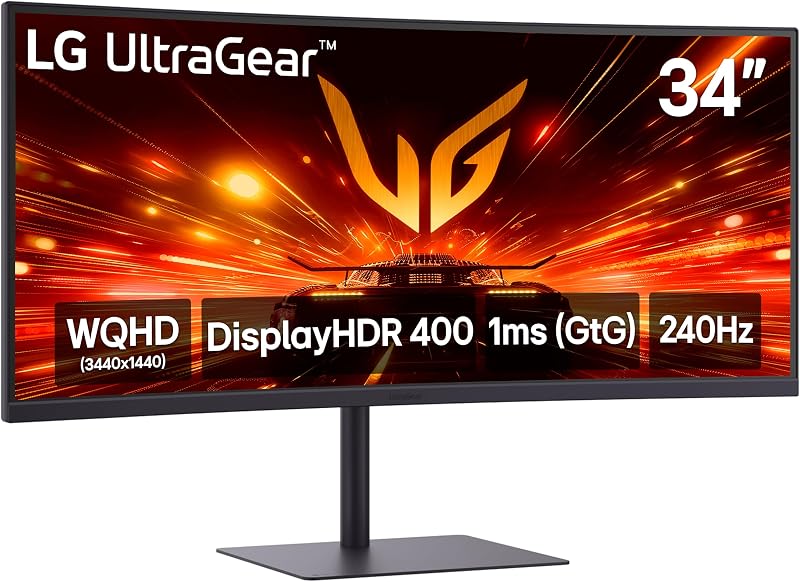
Best for: Video editors needing wide curved timelines
Pros
- Expansive 21:9 ultrawide canvas
- USB Type-C display input
- Built-in stereo speakers
Cons
- No portrait pivot adjustability
- Limited 15W USB-C power delivery
For editors wanting extensive horizontal workspace without multi-display arrangements, the LG 34G630A-B 34-Inch Ultragear WQHD features a 21:9 curved VA panel. Running at 3440 x 1440 resolution at 240Hz with a 1ms response time, this 34-inch screen accommodates video timelines and secondary windows side by side. Content creators reviewing high-resolution footage captured with a 24-70mm f2.8 sony lens will appreciate the expanded horizontal canvas for checking focal sharpness across wide projects. It features AMD FreeSync Premium, DisplayHDR 400, and up to 95% DCI-P3 color reproduction.
Mobile convenience is enhanced through a USB Type-C port delivering video display, data transfer, and 15W Power Delivery to connected laptops. Built-in stereo speakers eliminate the requirement to pack external audio equipment. The stand provides tilt, height, and swivel adjustments to align the curved screen, while firmware utilities include Dynamic Action Sync, Black Stabilizer, an FPS Counter, and crosshairs.
The lg 34g630a-b is ideal for timeline editors, audio engineers, and simulation gamers with wide desks. However, its 34-inch ultrawide chassis lacks vertical pivot capabilities and occupies significant desk depth. Creators with compact travel surfaces give way to 27-inch options that are significantly easier to pack and position.
| Aspect Ratio | 21:9 |
|---|---|
| Screen Finish | Matte |
| Contrast Ratio | 41.67 |
34 more published attributes
| Refresh Rate | 240 hertz |
|---|---|
| Display Type | LCD |
| Display Technology | VA |
| Viewing Angle | 178 degrees |
| Brightness | 300 candela_per_square_meter |
| Pixel Pitch | 0.23 |
| Color Gamut | 99 |
| Picture Quality Enhancement Technology | DisplayHDR 400, HDR10 |
| Screen Size | 34 inches |
| Item Dimensions D x W x H | 9.2"D x 31.8"W x 20.2"H |
| Item Weight | 16.1 pounds |
| Resolution | QHD Ultra Wide 1440p |
| Display Resolution Maximum | 3440 x 1440 pixels |
| Native Resolution | 3440×1440 |
| Response Time | 1 milliseconds |
| Total Number of HDMI Ports | 2 |
| Total Usb Ports | 3 |
| Number of Component Outputs | 2 |
| Total USB 3.0 Ports | 2 |
| Additional Features | Built-In Speakers, Curved, Dynamic Action Sync, Height Adjustment, High Dynamic Range, Swivel Adjustment, Ultrawide Screen |
| Specific Uses For Product | Desktop, Entertainment, Gaming |
| Color | Black |
| Mounting Type | Wall Mount |
| Shape | Curved |
| Brand | LG |
| Model Number | 34G630A-B.AUSQ |
| Model Name | 34G630A-B.AUSQ |
| Warranty Description | 1 Year Manufacturer |
| Included Components | DisplayPort Cable, HDMI Cable, Monitor, Power Cable |
| Power Consumption | 70 watts |
| Connectivity Technology | DisplayPort, HDMI, USB Type C |
| Hardware Connectivity | DisplayPort, HDMI |
| Adaptive Sync | FreeSync Premium |
| Screen Surface Description | Matte |
Specifications and price are read from the Amazon product listing, not measured by this site. Open the listing
LG 27GP750-B 27” Ultragear FHD
Best for: Budget-focused esports gamers and vertical workflows
Pros
- Fast 240Hz IPS motion
- Ergonomic portrait pivot stand
- 99 percent sRGB color coverage
Cons
- Coarser 0.31mm pixel pitch
The LG 27GP750-B 27” Ultragear FHD provides dependable high-frame-rate performance focused on speed and straightforward physical setup. Featuring a 27-inch Full HD (1920 x 1080) IPS panel, it offers a 240Hz refresh rate and a 1ms GtG response time. PC builders configuring compact travel rigs with asus rog aio coolers can easily drive maximum frame rates on this 1080p panel without overburdening their system.
The display features a matte finish, 400 cd/m² brightness, a 1000:1 contrast ratio, and HDR10 color with 99% sRGB coverage. The 3-side borderless design reduces frame distraction. The ergonomic stand provides tilt, height, and pivot adjustments with a quick press-and-click assembly for easy setup. NVIDIA G-SYNC Compatibility, AMD FreeSync Premium, and Dynamic Action Sync ensure responsive, tear-free motion.
The lg 27gp750-b fits fast-paced competitive esports titles and general web workflows. Its 0.31 mm pixel pitch means fine graphic details and text lack the crispness of QHD displays. Users needing higher pixel density and wider color spectrums give way to LG’s 1440p displays.
| Color | Black |
|---|---|
| Dimensions | 11.5 x 24.2 x 22.7 inches |
| Weight | 13.2 pounds |
Specifications and price are read from the Amazon product listing, not measured by this site. Open the listing
LG 27GS93QE 27-inch Ultragear OLED Gaming
Best for: Mobile creators needing anti-glare OLED visuals
Pros
- Near-instant 0.03ms response time
- Anti-glare low-reflection matte coating
- Two-year OLED panel warranty
Cons
- Subdued gloss depth compared to glossy OLED
The LG 27GS93QE 27-inch Ultragear OLED Gaming monitor pairs OLED performance with an anti-glare, low-reflection matte finish. With a 2560 x 1440 QHD resolution at 240Hz, it provides an ultra-fast 0.03ms response time. The self-lit panel delivers a 1,500,000:1 contrast ratio, 400 nits brightness, and DisplayHDR True Black 400 certification. The per-pixel lighting eliminates backlight bleed entirely, making dark scene details stand out distinctly.
The anti-glare surface treatment allows editing in brightly lit rooms without specular reflections. Color reproduction covers up to 98.5% of the DCI-P3 color gamut. Measuring 10.2 inches deep by 23.8 inches wide and 22.6 inches high, the stand provides tilt, height, and pivot adjustments. LG covers this monitor with a 2-year limited warranty protecting functional components, labor, and the OLED display panel.
The lg 27gs93qe is ideal for mobile creators and competitive gamers demanding OLED speed with glare protection. Unlike the glossy 27GX704A-B, this matte configuration maintains consistent visibility across uncontrolled ambient light environments. It gives way to the glossy LG 27GX704A-B for those who prioritize maximum perceived contrast pop in dark, dedicated editing suites.
| Color | Green/Red |
|---|---|
| Size | 27 inches |
| Dimensions | 10.2 x 23.8 x 22.6 Inches |
1 more published attribute
| Weight | 14.8 Pounds |
|---|
Specifications and price are read from the Amazon product listing, not measured by this site. Open the listing
Matching a Model to Your Setup
- On-the-go esports competition: The LG 27G440A-B delivers a high-speed 1080p 240Hz panel with tilt, swivel, height, and pivot ergonomics, fitting compact tournament desks while keeping GPU demands light.
- Hybrid creative editing and gaming: The LG 27GR83Q-B provides sharp 1440p resolution, 95% DCI-P3 color, and full 240Hz connectivity across HDMI 2.1 and DisplayPort 1.4 for balanced multi-device workstations.
- Color grading in light-controlled suites: The LG 27GX704A-B uses a glossy OLED panel with 1,500,000:1 contrast, 0.03ms speed, and 98.5% DCI-P3 coverage for deep shadow inspection.
- Expansive timeline video editing: The LG 34G630A-B provides a 34-inch 21:9 curved canvas, built-in speakers, and USB Type-C display input to declutter laptop editing setups.
- Responsive web development: The LG 27GP750-B provides 99% sRGB coverage, low input lag, and 90-degree pivot rotation for vertical document workflows at an efficient 1080p resolution.
- High-end creative production in mixed lighting: The LG 27GS93QE pairs OLED contrast, 0.03ms response times, and 98.5% DCI-P3 color with an anti-glare coating and a 2-year panel warranty.
Before You Buy
Before purchasing, consider desk dimensions and travel weight. The manufacturer listings do not specify the physical dimensions or weight of the external power brick adapters across these monitors. For traveling editors packing gear into carry-on luggage, the size and heft of an external power adapter can meaningfully influence packability.
Cable bundles and connectivity require attention due to listing omissions. While the specifications confirm DisplayPort 1.4, HDMI 2.1, and USB Type-C support, the listings do not specify the exact lengths of the included video cables or whether all connection types are packaged in the box. Additionally, on the LG 34G630A-B, the USB Type-C port provides 15W Power Delivery, which the listing does not designate for powering high-wattage laptops, requiring you to carry your laptop power supply.
FAQ
How does lg 240hz oled vs ips affect motion clarity and color?
The primary differences between LG 240Hz OLED and IPS displays involve response times, contrast, and brightness. IPS models like the LG 27G440A-B, LG 27GR83Q-B, and LG 27GP750-B provide 1ms GtG response times and 400 cd/m² brightness with a 1000:1 contrast ratio, handling bright rooms well. OLED models like the LG 27GX704A-B and LG 27GS93QE deliver 0.03ms response times and a 1,500,000:1 contrast ratio with DisplayHDR True Black 400. This provides motion without ghosting and true blacks, though standard brightness sits between 275 and 400 nits.
Can an lg 240 hz monitor run at 240Hz over both HDMI and DisplayPort?
High-refresh bandwidth varies by model and port version. The LG 27GR83Q-B explicitly supports 240Hz at QHD over both DisplayPort 1.4 and HDMI 2.1. The LG 27GX704A-B also features dual HDMI 2.1 and DisplayPort 1.4 inputs for high-refresh consoles and PCs. Other models may require DisplayPort 1.4 to unlock full 240Hz performance, with HDMI ports supporting lower refresh rates based on GPU specifications.
What ergonomic adjustments are standard across these monitors?
Ergonomic adjustability is extensive across LG’s 27-inch monitors. The LG 27G440A-B, LG 27GR83Q-B, LG 27GP750-B, and LG 27GS93QE all include stands with height, tilt, and 90-degree pivot rotation for vertical orientation. The curved 34-inch LG 34G630A-B offers tilt, height, and swivel adjustments, but its 21:9 curved aspect ratio does not support vertical 90-degree pivot rotation.
Is a glossy or matte finish better on an LG 240Hz OLED?
The choice depends on room lighting. The LG 27GX704A-B features a glossy screen that maximizes black depth, contrast, and visual punch in dark or dim edit suites. The LG 27GS93QE uses an Anti-Glare / Low Reflection matte finish designed to diffuse light in bright rooms. Traveling editors working in bright coworking spaces will benefit from the matte finish on the 27GS93QE.
Does the USB Type-C port on the LG 34G630A-B charge a laptop?
The USB Type-C port on the LG 34G630A-B supports display output and data transfer, but its Power Delivery is rated at 15W. While 15W can power phone accessories or low-draw peripherals, it is not sufficient to power demanding laptops during rendering or gaming sessions, so you must keep your dedicated laptop charger plugged in.
Side by side
The 6 models above, lined up on the attributes that every one of them publishes, plus the figures Amazon lists for all of them. Ratings are the average score left by Amazon buyers, not a score from this site.
| Attribute | 01 27G440A-B 27-Inch Ultragear Full HD | 02 27GR83Q-B 27-inch Ultragear QHD | 03 27GX704A-B 27-inch Ultragear QHD | 04 34G630A-B 34-Inch Ultragear WQHD | 05 27GP750-B 27” Ultragear FHD | 06 27GS93QE 27-inch Ultragear OLED Gaming |
|---|---|---|---|---|---|---|
| Buyer ratingaverage left by Amazon buyers | 4.7/5 | 4.9/5 | 4.7/5 | 4.4/5 | 4.3/5 | 4.5/5 |
| Color | Black | Black | Black | Black | Black | Green/Red |
Attributes that only some of the models publish are left out of this table; they stay in each model’s own spec sheet above.