As Amazon Associates, we earn from qualifying purchases. This means we may receive a small commission at no extra cost to you if you click through and make a purchase.
Mobile digital creators setting up in temporary studios, client suites, or remote destinations face a tough trade-off between workspace footprint and visual precision. Finding the right benq 27 inch monitor 4k display requires balancing color reproduction against desk real estate and cabling logistics. When editing high-resolution footage or color-grading stills away from a permanent studio, having a display that powers a laptop while carrying uncompressed video over a single link eliminates extraneous power bricks and bulky travel hubs.
BenQ organizes its 27-inch 4K category into targeted hardware tiers built for distinct creative workflows. The SW series caters to strict print and photography standards through dedicated hardware calibration and wide Adobe RGB coverage. The PD Designer line delivers factory-calibrated color spaces, integrated KVM switching, and dedicated controller pucks for multi-computer design desks. The MA series integrates directly into Apple ecosystems, matching MacBook color tuning and allowing keyboard-driven audio and brightness adjustments. Meanwhile, the MOBIUZ branch shifts focus toward fluid motion with high refresh rates, HDMI 2.1 throughput, and advanced multi-channel audio return.
BenQ 27-Inch 4K Monitors Lineup at a Glance
| Model | Color Gamut | Power Delivery | Screen Finish | Key Hub Feature |
|---|---|---|---|---|
| BenQ SW272U | 99% Adobe RGB / DCI-P3 | 90W USB-C | Glossy (Nano Matte) | Hardware Calibration & 16-Bit 3D LUT |
| BenQ PD2706U | 95% P3 / 99% sRGB | 90W USB-C | Matte | KVM Switch & HotKey Puck |
| BenQ MA270U | P3 Wide Gamut | 90W + 15W USB-C | Matte | Mac Keyboard Brightness & Volume Sync |
| BenQ MA270UP | P3 Wide Gamut | 90W + 15W USB-C | Glossy | Mac Keyboard Brightness & Volume Sync |
| BenQ MOBIUZ EX271U | 95% P3 / 99% Gamut | 65W USB-C | Matte | 165Hz Refresh & eARC 7.1 Audio |
| BenQ PD2725U | 95% P3 / 100% sRGB | 65W Thunderbolt 3 | Matte | 40 Gb/s Thunderbolt 3 Daisy Chaining |
The Models in Detail
BenQ SW272U 27-inch 4K 90W USB-C

Best for: Studio photographers needing hardware calibration
Pros
- 90W USB-C power delivery
- Hardware calibration with 16-bit 3D LUT
- 99% Adobe RGB and DCI-P3 coverage
Cons
- Glossy screen finish listed in specifications
- Standard 60Hz refresh rate
The BenQ SW272U 27-inch 4K 90W USB-C is engineered as a dedicated photography and color-critical grading monitor. The listing highlights a 3840×2160 IPS LCD panel capable of displaying 1.07 billion colors, backed by a 16-bit 3D Look-Up Table (LUT) and 99% coverage across Adobe RGB, DCI-P3, and Display P3 gamuts. For mobile photographers handling commercial client output on location, BenQ equips the display with Paper Color Sync technology, allowing editors to match their screen representation to specific printer models and paper stocks before printing. Hardware calibration is managed directly via Palette Master Ultimate software, ensuring color adjustments are stored internally inside the monitor rather than shifting when plugging into different host laptops.
Physical hardware on this BenQ SW272U unit balances studio ergonomics with desk stability. It features dimensions of 10.78 inches deep, 24.17 inches wide, and 17.78 inches high, with a rated brightness of 400 nits and a standard 1000:1 contrast ratio at a 60Hz refresh rate. While the listing specifications document a glossy panel finish, the feature overview specifically highlights a Nano Matte Panel certified for anti-reflection by TUV, designed to simulate physical paper texture and mitigate overhead glare in changing hotel or studio lighting. With 90W USB-C power delivery, traveling editors can feed video from a MacBook while keeping the battery fully charged over a single connection. When color grading moves beyond strict photographic print production into general multi-machine vector design, users often turn toward the PD series for integrated KVM utilities.
| Color | 2023 27" 4K Photo Editing Monitor |
|---|---|
| Size | 27 Inch |
| Dimensions | 10.78 x 24.17 x 17.78 inches |
1 more published attribute
| Weight | 18.95 pounds |
|---|
Specifications and price are read from the Amazon product listing, not measured by this site. Open the listing
BenQ PD2706U Mac-Ready Monitor 27” 4K
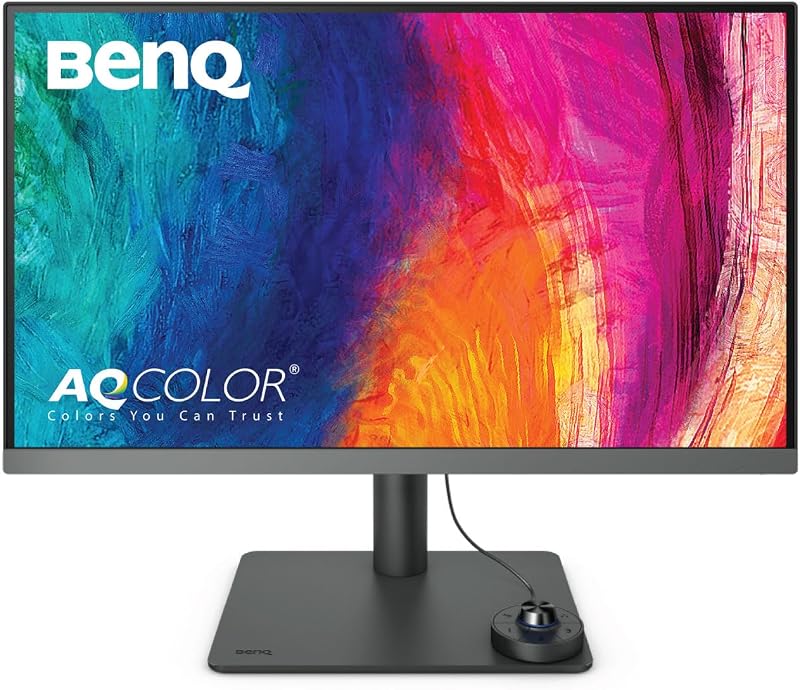
Best for: Commercial designers managing dual workstations
Pros
- 90W USB-C all-in-one charging
- Integrated KVM switch and HotKey Puck
- Factory-calibrated Delta E 3 or less
Cons
- 250 nits panel brightness
- Standard 60Hz refresh rate
Aimed directly at commercial illustrators, motion designers, and mixed-platform creatives, the BenQ PD2706U Mac-Ready Monitor 27” 4K brings factory-calibrated AQCOLOR technology to a versatile desktop layout. The listing notes 95% P3 and 99% sRGB/Rec.709 coverage with a verified Delta E of 3 or less, alongside validations from Pantone, Pantone SkinTone, and Calman. Traveling editors switching between varied ambient lighting conditions will appreciate BenQ’s Eye-Care suite, incorporating flicker-free circuitry, low blue light modes, and an anti-glare matte coating across its 250 nits IPS panel.
On-desk productivity is anchored by a built-in Keyboard Video Mouse (KVM) switch and the external BenQ HotKey Puck, which enables immediate switching between color profiles or input sources. The monitor supplies 90W USB-C power delivery to charge modern laptops, synchronizing display output and external accessories without messy splitters. BenQ ICCsync operates via Display Pilot software to synchronize color profiles between the monitor and connected Mac systems within one second. Sizing listed on Amazon notes item dimensions of 10 inches deep, 38 inches wide, and 30 inches high, which accounts for the packaged footprint. When comparing options in a benq 27 inch monitor 4k comparison, editors focused purely on macOS consistency often look toward the MA series for seamless native operating system integration.
| Color | Black |
|---|---|
| Dimensions | 10 x 38 x 30 inches |
| Weight | 26 Pounds |
Specifications and price are read from the Amazon product listing, not measured by this site. Open the listing
BenQ MA270U 27” 4K 3840×2160 Monitor
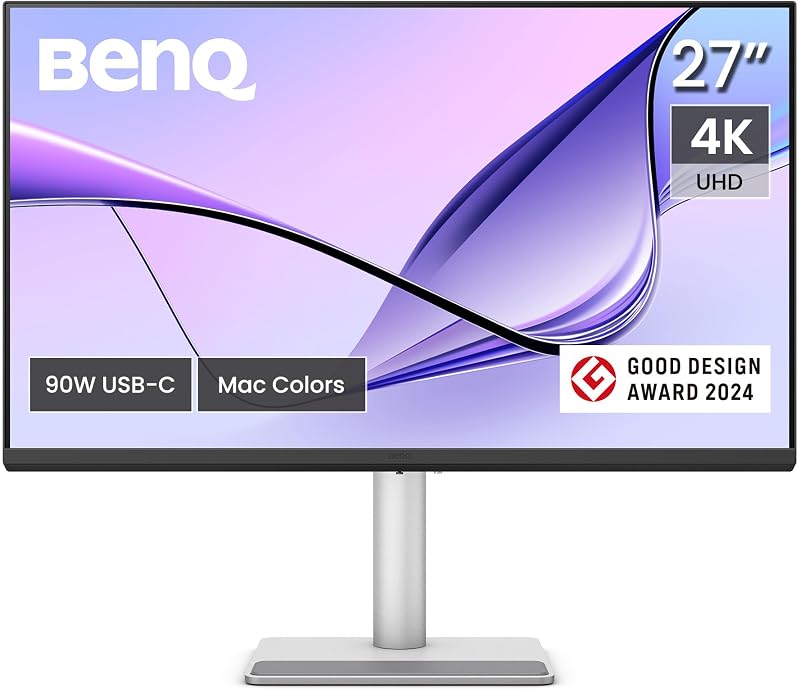
Best for: MacBook creators wanting matte anti-glare viewing
Pros
- High 2000:1 contrast ratio
- Direct MacBook brightness and volume controls
- Dual USB-C with 90W and 15W charging
Cons
- Standard 60Hz refresh rate
- No built-in KVM switch listed
The BenQ MA270U 27” 4K 3840×2160 Monitor is tailored specifically for Apple laptop users seeking zero calibration fuss. BenQ implements an exclusive Mac color tuning profile that directly mirrors MacBook Pro and MacBook Air Liquid Retina displays across the wide P3 color gamut. Unlike broader multi-purpose displays, the MA270U bridges the macOS hardware gap by supporting native Mac keyboard controls: users can adjust screen brightness and monitor speaker volume using the standard function keys on their Apple keyboards without touching on-screen display buttons.
For traveling creatives packing multiple personal devices, the connectivity hub provides remarkable utility. It incorporates two HDMI inputs and two USB-C ports, with the primary USB-C terminal outputting 90W to charge an Apple laptop, while the secondary USB-C port supplies 15W to keep an iPad or iPhone running simultaneously. The display features a matte panel surface, a bright 400 nits IPS panel, and an impressive 2000:1 contrast ratio that delivers deeper shadow separation than standard 1000:1 IPS screens. Its physical footprint measures 24 inches deep, 22 inches wide, and 8.6 inches high, mounted to a fully adjustable ergonomic stand that tilts, swivels, pivots, and shifts vertically. If you prefer glossy panel optics that mirror the bare glass of a laptop, BenQ offers the exact same internal architecture in the MA270UP. Editors contemplating larger desktop real estate like an lg 32 4k screen will notice this 27-inch footprint packs far more neatly into portable setups.
| Color | Sliver |
|---|---|
| Dimensions | 24 x 22 x 8.6 inches |
Specifications and price are read from the Amazon product listing, not measured by this site. Open the listing
BenQ MA270UP 27” 4K 3840×2160 Monitor

Best for: Mac users preferring vibrant glossy glass clarity
Pros
- High 2000:1 contrast ratio
- Native Mac keyboard control integration
- Dual USB-C ports with 90W power delivery
Cons
- Glossy finish reflections in bright rooms
- Standard 60Hz refresh rate
Providing the glossy counterpart to the matte MA270U, the BenQ MA270UP 27” 4K 3840×2160 Monitor targets visual editors who insist on the punchy contrast and uninhibited glass clarity typical of Apple hardware. The listing highlights an IPS display with 4K UHD resolution, 400 nits of peak brightness, a 2000:1 contrast ratio, and wide 178-degree viewing angles. Like its sibling, the monitor utilizes BenQ’s specialized Mac color tuning to ensure that P3 gamut assets match seamlessly between an open MacBook lid and the external display.
Connectivity mirrors the multi-device demands of remote professionals. The dual USB-C architecture provides 90W power delivery to run and recharge power-hungry MacBook Pro models, alongside an auxiliary 15W USB-C port tailored for fast charging phones or tablets. Mac keyboard brightness and audio controls remain fully integrated, keeping desk interactions fluid. The physical package lists dimensions of 8.6 inches deep, 24 inches wide, and 22 inches high, supported by an ergonomic stand with height, tilt, swivel, and pivot adjustments. The primary consideration between the MA270UP and the standard MA270U comes down to screen finish: the glossy coating enhances perceived color depth in controlled lighting, but reflects surrounding glare in sunlit co-working spaces.
| Color | Sliver |
|---|---|
| Dimensions | 8.6 x 24 x 22 Inches |
Specifications and price are read from the Amazon product listing, not measured by this site. Open the listing
BenQ MOBIUZ EX271U 27” 4K eARC
Best for: Hybrid video editors and high-refresh console gamers
Pros
- Fast 165Hz refresh rate and 1ms response
- Built-in eARC supporting 7.1 audio channels
- HDMI 2.1 and DP 1.4 with KVM
Cons
- Lower 400:1 listed contrast ratio
- Heavy 26-pound item weight
Content creators who split their time between high-bitrate video editing and competitive gaming will find a distinct hybrid platform in the BenQ MOBIUZ EX271U 27” 4K eARC. Moving far beyond the standard 60Hz limit of productivity monitors, the EX271U features a fast 165Hz refresh rate paired with a 1ms response time and AMD FreeSync Premium support. While traditional gaming screens like a dedicated alienware 27 inch monitor focus strictly on esports framerates, the EX271U maintains high visual fidelity with 4K resolution, 400 nits brightness, DisplayHDR 400, and 95% P3 color gamut coverage.
Modern mobile workstations benefit from comprehensive audiovisual connectivity. The EX271U incorporates BenQ’s Pixsoul Engine, AI Detail Enhancement, and Color Shuttle presets, which optimize game aesthetics and fine image textures. For audio professionals and console users, this is BenQ’s first gaming monitor with built-in eARC supporting up to 7.1 audio channels. Peripheral integration includes HDMI 2.1, DisplayPort 1.4, an integrated KVM switch, an included remote controller, and a 65W USB-C port for laptop docking. It is worth noting the listed 400:1 contrast ratio and a total item weight of 26 pounds, with dimensions of 32 inches deep, 18.89 inches wide, and 7.4 inches high, making it the most substantial and stationary model in the lineup.
| Color | White |
|---|---|
| Size | 27" |
| Dimensions | 32 x 18.89 x 7.4 inches |
1 more published attribute
| Weight | 26 pounds |
|---|
Specifications and price are read from the Amazon product listing, not measured by this site. Open the listing
BenQ PD2725U 27″ 4K IPS Thunderbolt
Best for: Multi-display Mac editors using Thunderbolt daisy-chaining
Pros
- Thunderbolt 3 with 40 Gb/s transfer speeds
- Dual 4K display daisy-chain support
- Hotkey Puck G2 and integrated KVM
Cons
- 65W power delivery lower than 90W models
- 250 nits brightness specification
For editors running complex production rigs with multiple storage arrays and secondary panels, the BenQ PD2725U 27″ 4K IPS Thunderbolt provides high-bandwidth data handling. The monitor utilizes genuine Thunderbolt 3 connectivity, delivering 40 Gb/s data speeds alongside 65W power delivery. This high throughput enables daisy-chain technology, allowing mobile creators to connect two 4K displays or high-speed RAID drives to a single port on their laptop. The listing specifies a 27-inch IPS panel with 3840×2160 resolution, 100% sRGB, 100% Rec.709, and 95% P3 coverage with factory-calibrated Delta E of 3 or less and Pantone validation.
Physical operation is streamlined through an included Hotkey Puck G2, an integrated KVM switch, and BenQ ICCsync software that automatically aligns the monitor to the Mac Display P3 color space. The physical interface is exceptionally robust, incorporating 2 Thunderbolt/USB-C ports, 2 HDMI ports, 1 DisplayPort, and a 3-port USB hub alongside a dedicated headphone jack. The matte IPS panel delivers 250 nits of brightness, a 1200:1 contrast ratio, and 178-degree viewing angles, housed in an ergonomic chassis supporting full height, tilt, swivel, and pivot adjustments. While its 65W power output is lower than the 90W USB-C options found on the PD2706U or MA270U, its 40 Gb/s daisy-chaining capability makes it the definitive choice for editors managing multi-drive video pipelines.
| Color | Black |
|---|---|
| Size | 27 Inch |
| Dimensions | 10.8 x 24.2 x 17.7 Inches |
1 more published attribute
| Weight | 18.3 pounds |
|---|
Specifications and price are read from the Amazon product listing, not measured by this site. Open the listing
Matching a Model to Your Setup
- Solo MacBook video editors working in temporary spaces who require 90W single-cable charging, native Apple keyboard brightness control, and glare-free viewing should choose the BenQ MA270U.
- Traveling studio photographers who produce fine-art prints on client locations and require internal hardware calibration with 99% Adobe RGB coverage will be best served by the BenQ SW272U.
- Multi-device graphic designers running a travel laptop alongside a client PC who need a desktop KVM switch and quick color puck adjustments should select the BenQ PD2706U.
- Digital editors who prioritize glossy, glass-like clarity and high 2000:1 contrast to mirror their MacBook screen in controlled lighting will find the ideal pairing in the BenQ MA270UP.
- Video editors who also capture high-framerate footage or game at 165Hz with 7.1-channel eARC external audio setups should deploy the BenQ MOBIUZ EX271U.
- High-end post-production editors who require multi-monitor daisy chaining and 40 Gb/s data transfers across external storage arrays should invest in the Thunderbolt-equipped BenQ PD2725U.
Before You Buy
When determining which benq 27 inch monitor 4k to buy, review what manufacturer listings do not explicitly detail regarding included travel accessories and physical transport. The product pages do not specify whether protective screen covers, padded carrying bags, or travel sleeves are included in the packaging. While 27-inch monitors provide superior workstation clarity compared to a compact lenovo 24 inch monitor, their listed shipping footprints and weights—reaching up to 26 pounds on the MOBIUZ EX271U—indicate that these units are designed to be packed inside rigid travel flight cases rather than standard laptop backpacks.
Cable inclusions and power delivery thresholds also require careful verification against your laptop’s specific power draw. While models like the BenQ SW272U, PD2706U, MA270U, and MA270UP deliver a robust 90W USB-C power delivery, the MOBIUZ EX271U and PD2725U cap their single-cable output at 65W. The listings do not specify whether 65W will sustain full battery performance on top-tier 16-inch laptops under maximum rendering loads without causing slow battery drain. Furthermore, while the listings outline display port specs such as HDMI 2.1 or Thunderbolt 3, they do not state whether full-length certified 40 Gb/s Thunderbolt cables or high-speed HDMI cords come in every retail box.
FAQ
Which is the best benq 4k monitor for macbook users on the go?
The BenQ MA270U and MA270UP are purpose-built for MacBook users. They feature BenQ’s exclusive Mac color tuning to mirror Apple Retina displays, provide 90W USB-C power delivery, offer a secondary 15W port for mobile devices, and allow users to adjust brightness and volume directly from their MacBook keyboard.
Can a benq usb-c 4k monitor charge a high-end laptop with one cable?
Yes, but power outputs vary across models. The BenQ SW272U, PD2706U, MA270U, and MA270UP output 90W through their primary USB-C ports, which is sufficient to power and charge most portable workstations. The BenQ MOBIUZ EX271U and PD2725U deliver 65W, which charges smaller laptops but may charge larger laptops more slowly under heavy render workloads.
What is the primary difference between the BenQ MA270U and MA270UP?
The sole functional difference identified in the listings is screen finish. The BenQ MA270U features a matte display surface designed to disperse ambient light and prevent reflections, while the BenQ MA270UP features a glossy screen finish that enhances perceived contrast and color saturation in dim or controlled studio environments.
Why choose the BenQ PD2725U over the BenQ PD2706U for video workflows?
The BenQ PD2725U provides genuine Thunderbolt 3 connectivity with 40 Gb/s transfer speeds, enabling high-speed daisy chaining of dual 4K monitors and fast data pipelines. The BenQ PD2706U utilizes standard 90W USB-C and features a KVM switch, but does not provide Thunderbolt 3 data throughput.
Is a 165Hz refresh rate necessary for 4K video and photo editing?
Standard color grading and photography workflows only require a standard 60Hz refresh rate, which is present on the SW, PD, and MA models. The 165Hz panel on the BenQ MOBIUZ EX271U is designed specifically for high-framerate video previewing, fast motion analysis, and high-performance gaming.
Side by side
The 6 models above, lined up on the attributes that every one of them publishes, plus the figures Amazon lists for all of them. Ratings are the average score left by Amazon buyers, not a score from this site.
| Attribute | 01 SW272U 27-inch 4K 90W USB-C | 02 PD2706U Mac-Ready Monitor 27” 4K | 03 MA270U 27” 4K 3840×2160 Monitor | 04 MA270UP 27” 4K 3840×2160 Monitor | 05 MOBIUZ EX271U 27” 4K eARC | 06 PD2725U 27" 4K IPS Thunderbolt |
|---|---|---|---|---|---|---|
| Buyer ratingaverage left by Amazon buyers | 4.2/5 | 4.1/5 | 4.0/5 | 4.4/5 | 4.0/5 | 4.5/5 |
| Color | 2023 27" 4K Photo Editing Monitor | Black | Sliver | Sliver | White | Black |
| Dimensions | 10.78 x 24.17 x 17.78 inches | 10 x 38 x 30 inches | 24 x 22 x 8.6 inches | 8.6 x 24 x 22 Inches | 32 x 18.89 x 7.4 inches | 10.8 x 24.2 x 17.7 Inches |
Attributes that only some of the models publish are left out of this table; they stay in each model’s own spec sheet above.