As Amazon Associates, we earn from qualifying purchases. This means we may receive a small commission at no extra cost to you if you click through and make a purchase.
Choosing the right dell inspiron lap top for remote work requires balancing physical pack weight against processing capability, workspace real estate, and battery longevity. Traveling professionals face distinct trade-offs between a broad 15.6-inch panel with an integrated numeric pad and a compact 14-inch convertible chassis that slides cleanly into a slim carry-on sleeve. Finding the right machine involves weighing how much local storage you require for offline travel files against how many hours you plan to spend away from an electrical outlet.
Dell structures its Inspiron lineup to cover standard clamshell productivity notebooks as well as flexible 2-in-1 hybrid devices. Within the current catalog, buyers can choose between cost-effective Intel Core i3 and AMD Ryzen 5 platforms for daily administration, or step up to multi-core Intel Core i5, Core i7, and modern Intel Core 5 processors for data manipulation and remote collaboration. Storage configurations range from 512GB up to expansive 1TB drives paired with memory capacities running from 8GB up to 32GB, allowing you to select a portable dell inspiron laptop tailored specifically to your mobile workflow.
Dell Inspiron laptops Lineup at a Glance
| Model | Display and Form Factor | Processor and Memory | Storage and Weight |
|---|---|---|---|
| DELL 13th Generation Business Inspiron 15 | 15.6-inch FHD Touchscreen Clamshell | Intel Core i7-1355U, 16GB RAM | 1TB SSD, 3.6 lbs |
| Dell Inspiron 15 15.6″ FHD Touchscreen | 15.6-inch FHD Touchscreen Clamshell | AMD Ryzen 5 7530U, 16GB RAM | 512GB SSD, Weight Unspecified |
| Dell Inspiron 3530 Laptop | 15.6-inch FHD Non-Touch Clamshell | Intel Core i3-1305U, 8GB RAM | 512GB SSD, 3.7 lbs |
| Dell Inspiron 15 Touchscreen Laptop | 15.6-inch FHD IPS Touchscreen Clamshell | Intel Core i5-1334U, 16GB RAM | 1TB Total (512GB SSD + 500GB Ext), 3.7 lbs |
| Dell Inspiron Touchscreen Laptop | 15.6-inch FHD IPS Touchscreen Clamshell | Intel Core i5-1155G7, 32GB RAM | 1TB SSD, 3.7 lbs |
| Dell Inspiron 14 7440 | 14-inch WUXGA Touch 2-in-1 Convertible | Intel Core 5 120U, 16GB DDR5 RAM | 512GB SSD, 2.9 lbs |
The Models in Detail
DELL 13th Generation Business Inspiron 15
Best for: Mobile professionals needing fast storage and multitasking
Pros
- 10-core Core i7 processor
- Roomy 1TB PCIe SSD
- Responsive 15.6-inch FHD touchscreen
Cons
- Weighs 3.6 pounds
- Listing omits battery run time
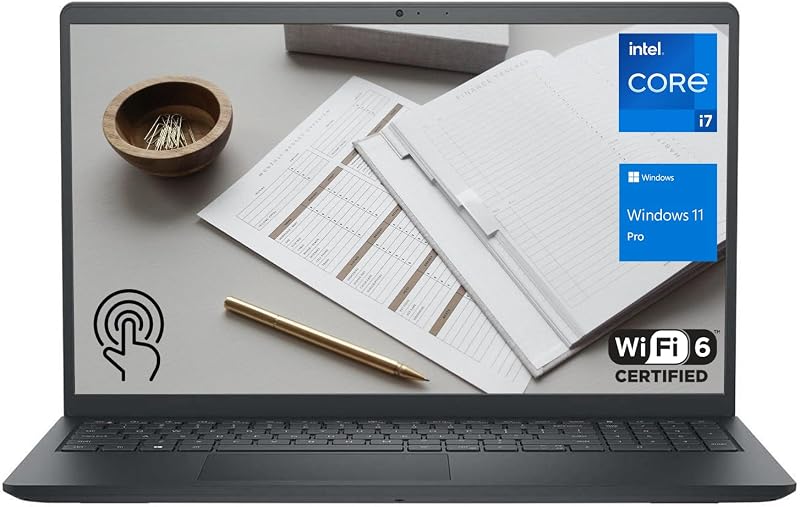
The DELL 13th Generation Business Inspiron 15 brings strong computing headroom to travelers who refuse to sacrifice desktop-like productivity on the road. Powered by a 13th Generation Intel Core i7-1355U processor with 10 cores and 12 threads alongside 16GB of high-bandwidth RAM, this model handles data crunching, expansive spreadsheet workflows, and heavy browser tab sessions smoothly. Its 1TB PCIe NVMe M.2 solid-state drive provides generous room for storing large presentation decks, offline video archives, and operating system backups without demanding external storage enclosures during transit.
Built with a 15.6-inch Full HD anti-glare WVA touchscreen, this machine lets you interact directly with onscreen content while presenting to colleagues or navigating complex dashboards. The chassis weighs in at 3.6 pounds, which remains manageable inside a commuter briefcase or standard travel pack. Additional hardware includes Wi-Fi 6 connectivity, a 1080p Full HD webcam for sharp video calls, an integrated SD card reader, and Windows 11 Pro for comprehensive remote enterprise management. Those who are comparing portable machines with top-tier silicon against broader laptops dell core i7 selections will appreciate how this configuration balances serious processing power with reasonable travel weight.
This notebook serves business consultants and traveling managers who need robust local computing power and full enterprise operating system controls. However, if your daily commute demands an ultra-compact footprint or all-day battery life away from outlets, this 15.6-inch model eventually gives way to smaller 14-inch convertibles in the Inspiron family.
| Color | Black |
|---|---|
| Hard-Drive Size | 1 TB |
| Operating System | Windows 11 Pro |
57 more published attributes
| Graphics Description | Integrated |
|---|---|
| Graphics Coprocessor | Intel Core Iris Xe Graphics |
| Hard Disk Description | SSD |
| Item Weight | 3.6 pounds |
| Video Processor | Intel |
| Graphics Card Ram | 4 GB |
| Automatic Backup Software Included | Webcam |
| Form Factor | Laptop |
| Hard Disk Interface | PCIE x 4 |
| Camera Description | 1080P HD Webcam |
| Graphics Ram Type | DDR4 SDRAM |
| Compatible Devices | Laptop, USB storage devices, Wi-Fi enabled devices, HDMI monitors, Bluetooth peripherals |
| Warranty Type | Limited |
| Item Dimensions L x W x Thickness | 14.11"L x 9.25"W x 0.75"Th |
| Power Device | AC adapter |
| Video Output | HDMI |
| Operating System Family | Windows |
| Number of Drivers | 1 |
| Screen Size | 15.6 inches |
| Resolution | 1080p |
| Native Resolution | 1920 x 1080 pixels |
| Display Type | LCD |
| Display Resolution Maximum | 1920×1080 pixels |
| Display Technology | LED |
| Display Refresh Rate in Hertz | 60 |
| Supported Monitor Maximum Quantity | 1 |
| Touch Screen Type | capacitive |
| Screen Finish | Glossy |
| Display Maximum Resolution | 1920 x 1080 |
| Connectivity Technology | Bluetooth, HDMI, USB, Wi-Fi |
| Wireless Technology | Wi-Fi |
| Wireless Compability | 5 GHz Radio Frequency, Bluetooth |
| Bluetooth Version | 5 |
| Wi-Fi Generation | Wi-Fi 6 |
| Human-Interface Input | Keyboard, Touchscreen |
| Keyboard Description | US |
| Notebook Pointing Device Description | [Partial] Touchscreen |
| Keyboard Layout | QWERTY |
| Control Method | Touch |
| Touchpad Feature | True |
| Processor Series | Core i7 Family |
| Processor Speed | 1.2 GHz |
| Processor Count | 10 |
| Processor Brand | Intel |
| CPU Model Number | i7-1355U |
| CPU Model Generation | 13 |
| CPU Model Speed Maximum | 5000 GHz |
| CPU Codename | Raptor Lake |
| Brand | Dell |
| Model Name | nspiron 15 3530 |
| Model Year | 2023 |
| Model Number | Inspiron 15 3530 |
| Built-In Media | Webcam, Stereo speakers, HDMI port |
| Series Number | 35 |
| Model Series | Inspiron |
| RAM Memory Installed | 16 GB |
| RAM Memory Technology | DDR4 |
Specifications and price are read from the Amazon product listing, not measured by this site. Open the listing
Dell Inspiron 15 15.6″ FHD Touchscreen

Best for: Remote workers wanting included accessories and storage
Pros
- Includes 6-in-1 hub and mouse
- Lifetime Microsoft Office license
- Generous 1TB combined storage setup
Cons
- Secondary storage is external drive
- Weighs 3.7 pounds

Best for: Everyday productivity and spreadsheet work on the go
Pros
- 6-core AMD Ryzen 5 processor
- Ergonomic lifted hinge design
- Full numeric keypad
Cons
- Listing omits exact weight
- Older Wi-Fi 5 wireless standard
The Dell Inspiron 15 15.6″ FHD Touchscreen relies on an AMD hardware architecture to power everyday office productivity and remote coursework. Built around the 6-core, 12-thread AMD Ryzen 5 7530U processor reaching clock speeds up to 4.5GHz, it delivers responsive multitasking performance backed by integrated AMD Radeon Graphics. With 16GB of system memory and a 512GB PCIe solid-state drive, this configuration ensures prompt boot sequences, snappy application launching, and dependable file storage for everyday travel needs.
Comfort plays a significant role in this model’s design, featuring a lifted hinge that props the deck up at an ergonomic angle to ease wrist tension during prolonged typing sessions in airport lounges or hotel desks. A full-size keyboard complete with an integrated numeric keypad speeds up numerical data entry and accounting tasks. The 15.6-inch 1080p touch display features anti-glare coatings and narrow borders, helping keep reflections under control in brightly lit environments, while peripheral options include USB Type-C, USB 3.2, USB 2.0, an SD card slot, and HDMI 1.4.
This configuration suits remote students and home-office professionals who prioritize tactile screen navigation and dedicated number keys for calculation-heavy duties. When your workflow involves resource-intensive local databases or enterprise deployment systems, this AMD machine steps aside for higher-memory Windows 11 Pro alternatives in the line.
| Color | Carbon Black |
|---|---|
| Size | 16GB RAM + 1TB Storage |
| Dimensions | 14.11 x 9.27 x 0.75 inches |
1 more published attribute
| Weight | 3.66 pounds |
|---|
Specifications and price are read from the Amazon product listing, not measured by this site. Open the listing
Dell Inspiron 3530 Laptop

Best for: Lightweight computing and blue light conscious travelers
Pros
- Adaptive thermals for lap usage
- Dell ComfortView reduces blue light
- Integrated numeric keypad and calculator key
Cons
- Entry-level 8GB RAM
- Intel Core i3 processor
The Dell Inspiron 3530 Laptop is tailored toward streamlined computing, focusing on practical essentials for travelers who primarily browse, draft documents, and stream media. Driven by an Intel Core i3-1305U processor paired with 8GB of DDR4 RAM and a 512GB solid-state drive, it delivers reliable day-to-day operation without excess power draw. The 15.6-inch Full HD non-touch display is equipped with Dell ComfortView software, a certified solution that actively reduces blue light emissions to help lessen eye fatigue during late-night work sessions.
Mobility is supported by Dell’s adaptive thermal architecture, which utilizes internal accelerometers and algorithmic sensing to determine whether the machine is resting on a sturdy desk or on your lap, adjusting its thermal profile and power output accordingly to remain cool and efficient. The laptop weighs 3.7 pounds and incorporates a lifted hinge for ergonomic typing, a built-in HD webcam, and a dedicated calculator hotkey adjacent to the numeric keypad. For enterprise travelers seeking a dependable dell laptop for business travel on standard workloads, its built-in Trusted Platform Module and military-grade durability testing provide welcome peace of mind.
Budget-conscious telecommuters, writers, and administrative workers will find this model well matched to essential office suites and web communications. When multitasking requires juggling heavy virtualization or dozens of memory-hungry browser extensions, the 8GB memory ceiling suggests stepping up to a 16GB or 32GB configuration instead.
| Color | Carbon Black |
|---|---|
| Size | 8GB | 512GB Storage |
| Dimensions | 9.27 x 14.11 x 0.75 inches |
1 more published attribute
| Weight | 3.66 pounds |
|---|
Specifications and price are read from the Amazon product listing, not measured by this site. Open the listing
Dell Inspiron 15 Touchscreen Laptop
The Dell Inspiron 15 Touchscreen Laptop addresses travelers who require an all-inclusive productivity bundle straight out of the box. At its heart sits a 10-core 13th Gen Intel Core i5-1334U processor capable of boosting up to 4.6GHz, complemented by 16GB of DDR4 RAM and Intel Iris Xe Graphics. Storage is uniquely divided into a fast 512GB internal PCIe NVMe SSD paired with an included 500GB portable external hard drive, providing a total of 1TB of combined space for working projects, media libraries, and system archives.
The visual experience centers on a 15.6-inch Full HD IPS anti-glare touchscreen with 178-degree wide viewing angles, making it easy to share slides or collaborate side-by-side. The package also includes a comprehensive accessory bundle consisting of a 6-in-1 USB-C docking hub, an HDMI cable, a wireless mouse with mouse pad, and a lifetime license for Microsoft Office. Weighing 3.7 pounds, the clamshell chassis runs Windows 11 Pro, supplying essential security features such as hardware-based isolation and advanced encryption protocols.
This comprehensive setup is tailored for remote contractors and small-business owners who want to set up an instant mobile workstation anywhere without buying separate peripheral adapters. If you prefer carrying a streamlined setup without managing external supplemental drives, unified single-drive SSD configurations in the Inspiron series provide a simpler physical profile.
| Color | 16GB RAM | 512GB SSD |
|---|---|
| Size | 16GB RAM | 512GB SSD |
| Dimensions | 14.11 x 9.27 x 0.75 inches |
1 more published attribute
| Weight | 3.59 Pounds |
|---|
Specifications and price are read from the Amazon product listing, not measured by this site. Open the listing
Dell Inspiron Touchscreen Laptop
Best for: Heavy multitaskers managing large local databases
Pros
- Massive 32GB system memory
- 1TB solid state drive
- FHD IPS touchscreen display
Cons
- Older 11th Gen quad-core processor
- 220-nit display is dim outdoors
The Dell Inspiron Touchscreen Laptop is configured specifically for heavy multitaskers who frequently run multiple local applications simultaneously. It boasts a massive 32GB of RAM paired with a 1TB solid-state drive, eliminating memory bottlenecks when switching between complex software suites, virtual machines, and sprawling data sheets. Processing tasks are driven by an Intel Quad-Core i5-1155G7 processor with 8 threads and clock speeds reaching up to 4.5GHz, accompanied by integrated Intel UHD Graphics.
Visual tasks are handled by a 15.6-inch Full HD IPS narrow-bezel touchscreen display running at 220 nits of brightness with anti-glare treatment. The laptop weighs 3.7 pounds and features an extensive port array that includes two USB 3.2 Type-A ports, a USB 2.0 port, HDMI 1.4 output supporting external monitors up to 1080p, an SD card reader, and a 720p HD webcam. Running Windows 11 Pro 64-bit, this portable machine aligns well with the operational demands of technical professionals, programmers, and small-business operators looking for a capable dell laptop i7 32gb ram 1tb ssd alternative that emphasizes maximum RAM capacity over newer CPU generations.
This notebook is an ideal match for power users whose workflows are constrained primarily by RAM capacity rather than raw clock cycles. However, if your daily travel involves working outdoors under bright sun where a 220-nit panel struggles, or if you need newer Wi-Fi 6 wireless standards, more modern Inspiron models offer brighter screens and updated networking.
| Color | Black |
|---|---|
| Size | Intel i5-1155G7 |
| Dimensions | 14.11 x 9.25 x 0.69 inches |
1 more published attribute
| Weight | 3.65 Pounds |
|---|
Specifications and price are read from the Amazon product listing, not measured by this site. Open the listing
Dell Inspiron 14 7440
Best for: Frequent flyers needing maximum portability and endurance
Pros
- Lightest build at 2.9 pounds
- Up to 10.20 hours battery life
- Versatile 360-degree 2-in-1 hinge
Cons
- Resealed packaging for memory upgrade
- Modest 512GB SSD capacity
The Dell Inspiron 14 7440 stands apart as the premier travel-first machine in the catalog, offering a flexible 2-in-1 convertible design with a 360-degree hinge. Weighing just 2.9 pounds, this is easily the most packable unit in the group, transforming effortlessly between traditional clamshell, tent, presentation stand, and tablet modes. It is powered by the latest Intel Core 5 120U processor featuring 10 cores, 12 threads, and speeds up to 5.0GHz, supported by 16GB of rapid DDR5 4800MHz memory and a 512GB PCIe NVMe SSD.
The 14-inch WUXGA touch display utilizes a taller 16:10 aspect ratio with a 1920×1200 resolution and 250 nits of brightness, giving mobile workers extra vertical screen real estate for reading documents and editing timelines. Endurance is a headline feature, with the listing citing up to 10.20 hours of battery life alongside ExpressCharge technology that restores 80 percent of battery capacity in just 60 minutes. Connectivity is exceptionally thorough, incorporating two USB Type-C 3.2 Gen 2 ports capable of 4K display output, two USB 3.2 Gen 1 Type-A ports, HDMI 1.4, an SD card slot, Intel Wi-Fi 6E, a backlit keyboard, and an FHD webcam. Note that the listing indicates this unit has been resealed by the seller to upgrade the memory and SSD, backed by a three-year warranty on those upgraded components.
Frequent flyers, digital nomads, and mobile presenters seeking the best dell inspiron for travel will find this lightweight 2-in-1 model unmatched in portability and battery endurance. Travelers who require a dedicated physical numeric keypad or larger 15.6-inch viewing dimensions will need to look back toward the full-sized Inspiron clamshell options.
| Color | Ice Blue |
|---|---|
| Size | 16GB|512GB |
| Dimensions | 12.36 x 8.9 x 0.74 inches |
1 more published attribute
| Weight | 2.91 pounds |
|---|
Specifications and price are read from the Amazon product listing, not measured by this site. Open the listing
Matching a Model to Your Setup
- Long-haul flights and cafe hopping: Choose the Dell Inspiron 14 7440 for its ultra-light 2.9-pound frame, 360-degree convertible versatility, and rated battery endurance of up to 10.20 hours.
- Heavy corporate multitasking and offline data: Pick the DELL 13th Generation Business Inspiron 15 to take advantage of its 10-core Core i7 processor, 1TB internal SSD, and Windows 11 Pro security tools.
- All-in-one pop-up workstation: Select the Dell Inspiron 15 Touchscreen Laptop if you want bundled accessories including a 6-in-1 docking station, external hard drive, wireless mouse, and lifetime office software.
- Memory-intensive programming and local virtualization: Opt for the Dell Inspiron Touchscreen Laptop with 32GB of RAM to handle multiple concurrent applications without system slowdowns.
- Routine document editing and remote classes: Go with the Dell Inspiron 3530 Laptop for everyday tasks supported by adaptive lap thermals, blue light reduction, and a dedicated numeric pad.
- Spreadsheet-focused finance work on a budget: Rely on the Dell Inspiron 15 15.6″ FHD Touchscreen for its 6-core AMD Ryzen processor, lifted typing hinge, and full numeric keypad.
Before You Buy
When conducting a thorough dell inspiron laptop comparison, it is critical to note that several listings omit specific battery capacity figures. While the Dell Inspiron 14 7440 explicitly advertises up to 10.20 hours of runtime and rapid ExpressCharge support, the listings for the 15.6-inch models do not specify exact watt-hour ratings or expected operating hours. Actual dell inspiron battery life across those larger machines will fluctuate heavily based on screen brightness levels, background application loads, and continuous Wi-Fi usage during mobile travel sessions.
Shoppers should also pay close attention to physical specifications and configuration disclosures before finalizing which dell inspiron to buy. The AMD-powered 15.6-inch model does not specify its total carry weight in the listing, whereas the other 15.6-inch variants hover between 3.6 and 3.7 pounds. Furthermore, both the Dell Inspiron Touchscreen Laptop and the Dell Inspiron 14 7440 represent custom-configured configurations where packaging has been opened to upgrade internal RAM and SSD storage, carrying specialized seller warranties on those modified components alongside standard factory coverage.
FAQ
How does dell inspiron battery life hold up during long travel days?
Battery longevity varies significantly across the product line based on chassis size and hardware components. The Dell Inspiron 14 7440 listing explicitly rates battery performance at up to 10.20 hours and features ExpressCharge technology that recovers up to 80 percent charge in 60 minutes. The listings for the 15.6-inch models do not specify exact operating hours, meaning travelers relying on those larger touchscreens should plan on carrying their power adapters for full workdays away from an outlet.
Which Dell Inspiron laptop is easiest to pack in a travel bag?
The Dell Inspiron 14 7440 is the clear leader for compact travel, weighing only 2.9 pounds with a slim 14-inch convertible footprint. In contrast, the 15.6-inch models weigh between 3.6 and 3.7 pounds and feature wider frames to accommodate their full-sized keyboards with numeric keypads, requiring larger commuter backpacks or dedicated laptop briefcases.
Do all of these Dell Inspiron laptops feature touchscreen displays?
Five of the six models reviewed feature interactive touchscreens. The DELL 13th Generation Business Inspiron 15, Dell Inspiron 15 15.6″ FHD Touchscreen, Dell Inspiron 15 Touchscreen Laptop, Dell Inspiron Touchscreen Laptop, and Dell Inspiron 14 7440 all support touch navigation. The Dell Inspiron 3530 Laptop is the sole clamshell in this roundup equipped with a standard non-touch display.
What operating systems come installed on these mobile laptops?
Operating systems differ across the lineup to match specific user profiles. The DELL 13th Generation Business Inspiron 15, Dell Inspiron 15 Touchscreen Laptop, Dell Inspiron Touchscreen Laptop, and Dell Inspiron 14 7440 all include Windows 11 Pro, offering enterprise-level security, BitLocker encryption, and remote management tools. The Dell Inspiron 3530 Laptop runs Windows 11 Home, while the AMD-powered Inspiron 15 includes standard Windows 11.
Can I connect multiple external monitors to these laptops while traveling?
Yes, external display support is available across these models through integrated HDMI ports and USB Type-C connections where equipped. For instance, the Dell Inspiron 14 7440 specifically supports dual external monitors via its HDMI 1.4 port at 1080p and its USB Type-C port at up to 4K resolution at 60Hz. The other models feature HDMI 1.4 ports supporting digital monitors up to 1920×1080 resolution.
Side by side
The 6 models above, lined up on the attributes that every one of them publishes, plus the score and listed price for all of them. Scores are out of 10, based on listed specifications and buyer feedback.
| Attribute | 01 13th Generation Business Inspiron 15 | 02 Inspiron 15 15.6" FHD Touchscreen | 03 Inspiron 3530 Laptop | 04 Inspiron 15 Touchscreen Laptop | 05 Inspiron Touchscreen Laptop | 06 Inspiron 14 7440 |
|---|---|---|---|---|---|---|
| Our scoreout of 10 | 8.8/10 | 9.6/10 | 8.2/10 | 8.6/10 | 9.2/10 | 8.0/10 |
| Color | Black | Carbon Black | Carbon Black | 16GB RAM | 512GB SSD | Black | Ice Blue |
Attributes that only some of the models publish are left out of this table; they stay in each model’s own spec sheet above.