As Amazon Associates, we earn from qualifying purchases. This means we may receive a small commission at no extra cost to you if you click through and make a purchase.
Setting up a portable workstation for remote access demands hardware that strips away unnecessary local bulk while maintaining reliable connectivity to your enterprise cloud infrastructure. When deploying an hp thin client on the go, the decision usually centers on finding the right compromise between physical chassis dimensions, processing capabilities, and available peripheral ports. Rather than packing a hefty tower or relying on mobile devices with limited external monitor expansion, remote operators frequently select a dedicated cloud terminal. These compact devices connect directly to central servers via remote desktop protocols, virtual desktop infrastructure, or secure web gateways, giving traveling professionals and branch personnel full access to their desktop environment from any hotel desk, shared office, or temporary workspace.
The lineup from this manufacturer follows a distinct structural hierarchy organized by processing tiers and form factor footprints. At the entry tier, the 500-series units emphasize small footprints, minimal energy consumption, and essential virtualization features suitable for standard office tasks. Moving into the 600-series provides a noticeable boost in multi-display outputs, expansion flexibility, and system memory to handle higher virtual desktop resolutions and demanding peripheral pipelines. At the peak of the compact desktop hierarchy sits the 700-series, which integrates high-tier embedded processors, robust graphics subsystems, and maximum configuration options for complex virtualization tasks. Understanding this tier structure simplifies an hp thin client comparison and helps you decide exactly which hp thin client to buy based on your mobility and workspace demands.
HP Thin Clients Lineup at a Glance
| Model | Processor Architecture | System Memory & Flash Storage | Primary Video Output | Chassis / Design Form |
|---|---|---|---|---|
| HP t740 Thin Client | AMD Ryzen V1756B (4 Cores, 3.25 GHz) | 8 GB DDR4L / 64 GB Flash SSD | DisplayPort & HDMI | Computer Tower (Air Cooled) |
| HP t640 Thin Client | AMD Ryzen R1505G (2 Cores, 2.40 GHz) | 4 GB DDR4 / 16 GB Flash | DisplayPort | Stick PC / Compact Form |
| HP t630 Thin Client | AMD G-Series GX-420GI (4 Cores, 2.0 GHz) | Unspecified RAM / SSD Storage | DisplayPort (Dual 4K Capable) | Computer Tower (3.4 lbs) |
| HP 3GM95UT#ABA t530 Thin Client | AMD Thin Client Platform (Radeon R2) | 4 GB RAM / 8 GB Flash | VGA | Slim Tower (1.4-inch width, 2.1 lbs) |
| HP Pro t550 Thin Client Celeron | Intel Celeron J6412 (4 Cores, 2.0 GHz) | 4 GB DDR4 / 32 GB Flash SSD | DisplayPort | Compact Tower (Wi-Fi 6) |
| HP Flexible Thin Client G9F04AT#ABA Desktop(Black) | Embedded Flexible Architecture | Unspecified RAM / SSD Storage | DisplayPort | Ultra-Lightweight Desktop (7.2 oz) |
The Models in Detail
HP t740 Thin Client

Best for: Heavy virtual desktop multitasking and media
Pros
- AMD Ryzen V1756B processor
- 8 GB memory with 64 GB storage
- Multiple DisplayPort and HDMI outputs
Cons
- Heavier desktop footprint
- Higher baseline power consumption
The HP t740 Thin Client stands as the performance-oriented powerhouse of this vendor’s terminal catalog. At its core is an AMD Ryzen V1756B quad-core processor clocking in at 3.25 GHz, supported by an AMD Radeon Vega 8 integrated graphics subsystem. The unit arrives equipped with 8 GB of DDR4L SDRAM alongside 64 GB of local flash SSD storage, creating ample capacity for complex client operating systems like the preloaded Windows 10 IoT Enterprise. Hardware connectivity is extensive, providing Gigabit Ethernet, Bluetooth, multiple standard USB ports, legacy USB 2.0 connections, and dedicated microphone audio input. For multi-display setups, it features both DisplayPort and HDMI video outputs, which easily mate with workstation displays or an external hospitality panel like a samsung ultra thin tv in a remote field office.
Air cooling ensures reliable thermal dissipation throughout continuous operation, and the listing specifically indicates an EU spare part availability duration of seven years, highlighting long-term deployment viability. This robust construction makes the hp t740 thin client exceptionally suited for demanding enterprise remote desktop protocols that process high-resolution graphics, digital media streams, or virtualized multi-window workflows. It gives power users a responsive feel that mirrors local computing without compromising centralized administration.
Because of its expanded internal power delivery and desktop tower profile, this unit is bulkier than the ultra-slim terminal alternatives in the catalog. While traveling teams can pack it into hard-shell gear cases for field bases, it is less optimal for light-and-fast backpack travelers who prioritize negligible pack weight. For setups requiring raw client-side computing and high peripheral bandwidth, however, it stands unmatched within the family.
| Color | Black |
|---|
Specifications and price are read from the Amazon product listing, not measured by this site. Open the listing
HP t640 Thin Client

Best for: Balanced cloud processing on remote desks
Pros
- AMD Ryzen R1505G dual-core processor
- Radeon Vega 3 graphics
- Gigabit Ethernet connectivity
Cons
- Modest 16 GB flash storage
- 4 GB installed memory
Positioned as an agile mid-tier workstation terminal, the HP t640 Thin Client bridges the gap between slim profile enclosures and responsive multi-tasking capabilities. The hardware specification lists an AMD Ryzen R1505G dual-core processor operating at a 2.40 GHz base clock, while supplementary listing specifications also reference a 3.3 GHz Ryzen 5 platform with dedicated AMD Radeon Vega 3 graphics coprocessing. System memory is sized at 4 GB of DDR4 SDRAM, accompanied by 16 GB of local flash storage. It operates across Windows 10 and ThinPro environments, leveraging Gigabit Ethernet and DisplayPort interfaces to interface smoothly with corporate virtual private networks and modern high-resolution displays.
The physical listing catalogs the chassis design type as a stick PC configuration with a compact 2.5-inch parameter, reflecting an ultra-dense format engineered to clear clutter from crowded workspaces. For users who frequently compare mobile desktop solutions against a conventional laptop i5 msi setup, the hp t640 thin client provides an alternative stationary cloud terminal that avoids the battery wear and display limitations of standard road-warrior hardware. It handles routine virtual desktop sessions, terminal emulation, and secure web applications with quiet efficiency.
This model yields ground to the larger t740 when you need to run extensive local caching or drive triple and quad monitor arrays via hardware outputs. The 16 GB flash storage and 4 GB memory ceiling suit streamlined operating system images rather than storage-intensive edge deployments. It remains a dependable option for general remote personnel seeking a reliable mid-range footprint.
| Color | Black |
|---|---|
| Dimensions | 7.7 x 1.4 x 7.7 inches |
| Weight | 5.8 pounds |
Specifications and price are read from the Amazon product listing, not measured by this site. Open the listing
HP t630 Thin Client
Best for: Multi-monitor enterprise cloud terminal workstations
Pros
- AMD G-Series quad-core processor
- Dual 4K display compatibility
- Substantial chassis build
Cons
- Weighs 3.4 pounds
- Older ATA-4 disk interface
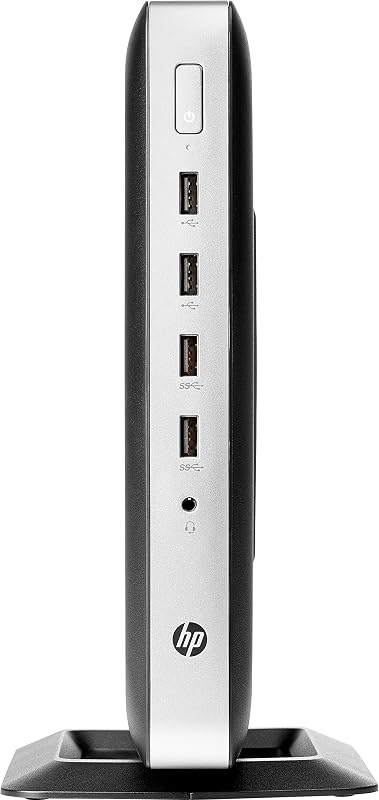
Built with enterprise durability in mind, the HP t630 Thin Client focuses on long operational lifecycles and stable peripheral integration. Driving the terminal is an AMD G-Series GX-420GI quad-core processor running at 2.0 GHz, running Windows 10 for enterprise management consistency. The chassis measures 4.72 by 8.66 by 9.88 inches and carries a net weight of 3.4 pounds, giving it a reassuringly solid desktop footprint. Local storage is provided via an SSD over an ATA-4 disk interface, paired with comprehensive USB connectivity, microphone inputs, and a listed BD-R optical storage device.
The primary advantage of the hp t630 thin client is its verified support for dual UHD/4K display outputs via DisplayPort. Professionals dealing with complex spreadsheets, monitoring consoles, or multi-terminal dashboards can drive dual ultra-high-definition displays without frame stuttering over cloud virtualization sessions. The substantial chassis also provides stable physical placement on desks subject to constant cable adjustments and peripheral swapping.
At 3.4 pounds, this unit is one of the heavier desktop options in the manufacturer’s lineup, meaning mobile operators must commit noticeable luggage room to transport it. For stationary branch deployments or semi-permanent project trailers where multi-display UHD clarity is mandatory, the t630 remains a capable and sturdy cloud bridge.
| Color | Black |
|---|---|
| Dimensions | 4.72 x 8.66 x 9.88 inches |
| Weight | 3.35 pounds |
Specifications and price are read from the Amazon product listing, not measured by this site. Open the listing
HP 3GM95UT#ABA t530 Thin Client

Best for: Slim packable travel desktop setups
Pros
- Ultra-slim 1.4-inch chassis
- Modern USB-C connectivity
- Lightweight 2.1-pound build
Cons
- Limited 8 GB flash capacity
- VGA video output
The HP 3GM95UT#ABA t530 Thin Client introduces a modern, space-conscious silhouette designed for tight workspaces and minimalist terminal deployments. Encased in an enclosure measuring just 1.4 by 7.9 by 7.9 inches and weighing an agile 2.1 pounds, it is exceptionally easy to stow in travel sleeves or luggage compartments. Processing tasks are handled by modern AMD thin client architecture paired with integrated AMD Radeon R2 graphics, 4 GB of RAM, and 8 GB of internal flash storage. The unit runs HP Smart Zero Technology, an operating platform geared toward zero-client administration, rapid deployment, and minimal local maintenance.
Connectivity stands out on this model thanks to the inclusion of a modern USB Type-C port alongside standard USB interfaces, Bluetooth wireless connectivity, and an analog VGA video output interface. The listing also details an HDD storage description, BD-R optical capability, and an official Energy Star specification rating. For on-the-go coordinators who need to link up with older hotel presentation gear or client meeting rooms, the built-in VGA port ensures broad backward compatibility with legacy monitors and meeting room projectors.
Where this hp t530 thin client makes concessions is in local storage and modern digital video out of the box. With 8 GB of flash storage, local caching is strictly limited, requiring your host infrastructure to handle virtually all computing overhead. Users who demand multi-monitor digital pipelines will need to look toward the DisplayPort-equipped alternatives in the 600-series or 700-series.
| Color | Black |
|---|---|
| Dimensions | 1.4 x 7.9 x 7.9 Inches |
| Weight | 2.12 Pounds |
Specifications and price are read from the Amazon product listing, not measured by this site. Open the listing
HP Pro t550 Thin Client Celeron
Best for: Modern wireless enterprise terminal environments
Pros
- Intel Celeron J6412 quad-core
- Fast Wi-Fi 6 wireless
- 32 GB flash memory
Cons
- Single display output type
- 4 GB system memory
Bringing modern silicon to the entry-level virtualization category, the HP Pro t550 Thin Client Celeron utilizes an Intel Celeron J6412 quad-core processor running at a base clock of 2.0 GHz. Supporting the processor is 4 GB of DDR4 SDRAM and a 32 GB flash solid-state drive operating over a Serial ATA bus. Operating system support covers both Windows 10 and HP ThinPro English editions. A standout inclusion on this model is factory support for IEEE 802.11ax (Wi-Fi 6) wireless networking alongside its Gigabit Ethernet port, granting true high-speed untethered network flexibility.
The compact computer tower chassis measures 6 by 7 by 4 inches, ensuring it occupies minimal surface area on mobile folding desks or hotel writing stands. It features native DisplayPort outputs, integrated Intel UHD Graphics, and listed compatibility with external peripherals including keyboards, mice, and remote controls. When compared against traveling with a large-format desktop replacement such as an hp – 15.6 full hd touch-screen laptop – intel core i7 – 16gb memory – 512gb ssd – natural silver, this dedicated terminal offers a clean, zero-fanfare setup that isolates critical organizational data on the central cloud server.
With 32 GB of local storage, the hp pro t550 thin client accommodates more substantial client operating system images than earlier 500-series releases. It is an outstanding match for mobile executives who demand modern Wi-Fi 6 wireless mobility, though users requiring discrete-grade graphics acceleration will still prefer the larger Ryzen Vega engines.
| Color | Black |
|---|---|
| Dimensions | 6 x 7 x 4 inches |
Specifications and price are read from the Amazon product listing, not measured by this site. Open the listing
HP Flexible Thin Client G9F04AT#ABA Desktop(Black)
Best for: Basic lightweight virtual desktop access
Pros
- Extremely light 7.2-ounce weight
- DisplayPort connectivity
- Energy Star certified
Cons
- Legacy 32-bit operating system
- Unspecified RAM capacity
Engineered for featherweight deployments and virtual network integration, the HP Flexible Thin Client G9F04AT#ABA Desktop(Black) is cataloged in the product documentation as an HP T520 series flexible thin client platform. The terminal runs an optimized HP ThinPro 32-bit operating system aimed squarely at knowledge base workers and task-oriented virtual network users. Its physical specifications report an astonishingly light weight of only 7.2 ounces, paired with an enclosure measuring 17.7 by 4.8 by 10 inches. The terminal carries Energy Star certification and eliminates moving optical components entirely, utilizing a solid-state drive interface operating across Serial ATA.
Physical I/O includes reliable DisplayPort digital video output, standard USB peripheral ports, and broad capability across personal, business, and light client applications. The streamlined nature of an hp flexible thin client ensures swift boot cycles and rapid connection to Citrix, VMware, or Microsoft Remote Desktop sessions with practically zero configuration hurdles upon arrival at a new workstation.
Because this model operates on a 32-bit operating system architecture and does not specify its installed system RAM capacity in the listing, it represents an entry-tier access point best reserved for dedicated remote desktop protocols rather than running intensive local utilities. It provides the ultimate pack-light footprint for task workers who require nothing more than an agile gateway to their cloud server.
| Color | Black |
|---|---|
| Dimensions | 17.7 x 4.8 x 10 Inches |
| Weight | 0.45 Pounds |
Specifications and price are read from the Amazon product listing, not measured by this site. Open the listing
Matching a Model to Your Setup
- High-throughput visual workflows and multi-monitor setups: Choose the HP t740 Thin Client for its quad-core Ryzen processing, 8 GB memory, 64 GB storage, and flexible DisplayPort plus HDMI connectivity.
- Modern wireless remote setups in temporary offices: Select the HP Pro t550 Thin Client Celeron to leverage high-speed Wi-Fi 6 (802.11ax) alongside quad-core Intel processing and 32 GB flash storage.
- Fixed branch terminals requiring dual 4K video: Pick the HP t630 Thin Client to take advantage of dual UHD/4K display support and a durable 3.4-pound tower chassis.
- Ultra-portable packing for frequent relocations: Deploy the HP Flexible Thin Client G9F04AT#ABA Desktop(Black) to capitalize on its 7.2-ounce build and streamlined HP ThinPro operating system.
- Legacy monitor integration on mobile deployments: Opt for the HP 3GM95UT#ABA t530 Thin Client for its native analog VGA port, USB-C connectivity, and slim 1.4-inch chassis profile.
- General-purpose virtual computing with space constraints: Rely on the HP t640 Thin Client for its balanced dual-core Ryzen processing, Radeon Vega 3 graphics, and compact stick PC design.
Before You Buy
Before finalizing your terminal selection, review the specific network protocols and power requirements of your deployment destination. The product listings do not specify whether mounting brackets, VESA adapters, or external monitor clips are included in the retail packaging. If you intend to attach your terminal directly to the rear of a display panel to minimize desk clutter, verify your mounting hardware separately before embarking on a field assignment.
Additionally, the listings do not specify complete details regarding included display cables, such as DisplayPort-to-HDMI adapters or auxiliary power supply bricks for global voltage standards. Operating system licensing nuances, specifically differences between Windows 10 IoT Enterprise, HP ThinPro 32-bit, and HP Smart Zero platforms, should be coordinated with your system administrator to ensure seamless authentication with your enterprise cloud infrastructure.
FAQ
What is the primary difference between HP ThinPro and Windows 10 IoT on these terminals?
HP ThinPro is a specialized, Linux-based operating system designed exclusively for secure cloud terminal access, featuring an ultra-low storage footprint and rapid boot times. Windows 10 IoT Enterprise provides a familiar Windows environment, broad local peripheral driver compatibility, and integrated support for corporate domain management tools.
Can a compact HP thin client support multiple monitors while traveling?
Yes, models such as the HP t740 Thin Client and HP t630 Thin Client feature native multi-display support, including dual 4K UHD video pipelines over DisplayPort and HDMI. You can connect two separate monitors to expand your digital workspace wherever compatible displays are available.
Do these thin clients feature built-in wireless connectivity?
Wireless capabilities vary across the lineup. The HP Pro t550 Thin Client explicitly lists high-speed IEEE 802.11ax (Wi-Fi 6) wireless networking, and the t740 and t530 models include Bluetooth, whereas other models rely primarily on Gigabit Ethernet ports unless external USB wireless adapters are supplied.
How much local storage is required on an enterprise thin client?
Because thin clients stream computing sessions from a centralized remote server, they require very little internal storage. Flash storage ranging from 8 GB on the t530 to 64 GB on the t740 is primarily used to store the operating system kernel, network configuration files, and connection client software.
Are optical drives standard equipment on compact thin clients?
While standard modern thin clients omit moving optical media to maintain durability, listings for the HP t630 and HP t530 specifically cite BD-R optical storage hardware specifications, whereas the HP Flexible Thin Client specifically confirms no optical drive is installed.
Side by side
The 6 models above, lined up on the attributes that every one of them publishes, plus the figures Amazon lists for all of them. Ratings are the average score left by Amazon buyers, not a score from this site.
| Attribute | 01 t740 Thin Client | 02 t640 Thin Client | 03 t630 Thin Client | 04 3GM95UT#ABA t530 Thin Client | 05 Pro t550 Thin Client Celeron | 06 Flexible Thin Client G9F04AT#ABA Desktop(Black) |
|---|---|---|---|---|---|---|
| Buyer ratingaverage left by Amazon buyers | 4.0/5 | 4.6/5 | 4.4/5 | 4.4/5 | 4.0/5 | 4.8/5 |
| Color | Black | Black | Black | Black | Black | Black |
Attributes that only some of the models publish are left out of this table; they stay in each model’s own spec sheet above.