As Amazon Associates, we earn from qualifying purchases. This means we may receive a small commission at no extra cost to you if you click through and make a purchase.
Finding the right desktop anchor for a mobile creative workflow involves weighing port selection, electrical capacity, and gear bag packability. On-the-go video and photo editors often transform cramped hotel desks, shared studio tables, and temporary production suites into functional editing workstations. Choosing the ideal hub requires deciding whether you need multi-display rendering pipelines, massive wattage to energize multiple devices simultaneously, or a pocket-sized interface that disappears into an accessory pouch until needed.
Anker organizes its connectivity lineup into distinct hardware classes tailored to specific desk and field requirements. The company’s catalog separates heavy-duty multi-display docks equipped with diagnostic feedback screens, high-capacity GaN power stations designed to supply substantial current across several devices, and streamlined travel splitters intended for featherweight portability. Conducting a thorough anker desk hub comparison helps clarify which anker desk hub to buy by analyzing physical footprints, port architectures, host power delivery, and connectivity limitations directly from the manufacturer specifications.
Anker Desk Hub Lineup at a Glance
| Model | Primary Function | Port Selection & Video | Power Delivery & Weight |
|---|---|---|---|
| Anker Nano 10in1 USB C Hub | Dual-display productivity dock with smart diagnostic screen | 10 ports: HDMI 2.1, DP 1.4, 10Gbps USB-C, 10Gbps USB-A, 2x 5Gbps USB-A, Gigabit Ethernet, SD/TF | 100W PD-IN (up to 80W host charging); 423 g (14.92 oz) |
| Anker Prime Charging Station | High-wattage desktop multi-device charging station | 6 ports: 4x USB-C, 2x USB-A (No video or display output) | 250W total output (up to 140W on Port 1); 640 g (22.58 oz) |
| Anker USB C Hub | Ultralight mobile video and peripheral adapter | 5 ports: HDMI (4K@30Hz), 5Gbps USB-C, 2x 5Gbps USB-A, 100W PD-IN | 100W PD-IN (up to 85W pass-through host charging); 1.44 oz (40.8 g) |
The Models in Detail
Anker Nano 10in1 USB C Hub

Best for: Multi-monitor desktop editors needing detailed metrics
Pros
- Dual 2K 240Hz support
- Integrated telemetry display
- Rear-facing cable layout
- 10 Gbps fast transfers
Cons
- MacOS dual display mirrors only
- Wall charger not included
The Anker Nano 10in1 USB C Hub serves as a comprehensive command center for mobile creators who establish stationary editing desks during extended assignments. Built with an upright form factor measuring 5.12 inches long, 2.19 inches wide, and 1.97 inches high, this iron gray dock weighs 423 grams and features a magnetic base that optimizes the viewing angle of its integrated display. The hardware interface integrates ten functional connections, featuring an HDMI 2.1 port, a DisplayPort 1.4 interface, a Gigabit Ethernet jack, SD and microSD 3.0 card readers, a 10 Gbps USB-C port, a 10 Gbps USB-A port, two 5 Gbps USB-A connections, and a dedicated 100W maximum USB-C Power Delivery input port that supplies up to 80W of host charging. Cables route cleanly away from the workspace because 80 percent of the ports face the rear, while a generous 27.6-inch integrated host cable allows flexible placement under or beside laptop risers.
Display capabilities stand out as a central feature of this anker docking station dual monitor setup. The hub drives a single monitor at up to 4K resolution at 144 Hz or 2K resolution at 240 Hz, and it can expand workstation visual real estate across dual displays running at 2K resolution at 240 Hz. Achieving dual 2K output at 240 Hz requires a host laptop USB-C port that supports DisplayPort 2.1 with DSC 3:1 compression. The unit is compatible with Windows 10 and 11 as well as macOS laptops featuring USB-C connections supporting Power Delivery, DisplayPort 1.2, 1.4, or 2.1, and USB4 or Thunderbolt 3, 4, or 5. However, listing specifications state that macOS handles dual external monitors exclusively in mirror mode, projecting identical content on both screens. The listing also notes that the hardware is incompatible with Linux operating systems.
Diagnostic visibility and desk routine management are handled through the built-in color smart screen. This interface offers real-time telemetry on port connectivity status, host charging wattage, peripheral data transfer speeds, and internal hardware operating temperatures. Users can customize the anker smart display hub interface using a web dashboard or mobile application, which allows uploading personal images for rotating photo slideshows, installing firmware updates, or activating an integrated 25-minute focus timer by double-pressing the control interface. The retail package contains the desktop dock, the magnetic stand base, a safety guidance sheet with a QR code linking to the user manual, and customer service documentation. The listing explicitly notes that an external wall charger is not included in the box.
| Color | Iron Gray |
|---|---|
| Dimensions | 5.12 x 1.97 x 2.19 inches |
| Weight | 0.73 Pounds |
Specifications and price are read from the Amazon product listing, not measured by this site. Open the listing
Anker Prime Charging Station

Best for: Stationary editors managing heavy multi-device power
Pros
- Massive 250W total output
- 140W single-port delivery
- Smart LCD control dial
- Six concurrent charging ports
Cons
- No video or data ports
- Heavy footprint for travel
When the editing bottleneck is device power rather than display routing, the Anker Prime Charging Station functions as an industrial-grade energy reservoir. Operating as a corded electric 250W anker multi port charger built on GaNPrime technology, this unit supplies high-capacity power across six dedicated charging ports, comprising four USB-C connections and two USB-A outlets. The primary USB-C port delivers up to 140W of dedicated throughput, capable of charging a 16-inch MacBook Pro to 50 percent battery capacity in 25 minutes. Built for heavy multi-device desks, the unit accepts an input voltage of up to 240 volts with an amperage rating of 5A, distributing intelligent electrical current to laptops, tablets, smartphones, and camera gear simultaneously.
Real-time electrical monitoring is managed through an integrated 2.26-inch LCD display, sized roughly like a postage stamp, which provides immediate readouts of active charging speeds and per-port power allocations. Beside the screen, a tactile smart control dial enables creators to manually adjust energy output curves to match sensitive equipment profiles. The station includes smart Internet of Things capabilities that synchronize with the companion Anker application, though listing notes clarify that the device supports 2.4 GHz Wi-Fi networks only and does not connect to 5 GHz frequencies. The box supplies the 250W GaN desktop charging station, a welcome setup guide, customer service details, and an extended 24-month warranty.
Physical proportions make clear that this usb charging station anker platform is engineered primarily for desk-bound installations rather than ultra-light transit bags. The chassis measures 4.18 by 1.58 by 3.64 inches (106.2 by 40.2 by 92.5 millimeters) and weighs 22.58 ounces (640 grams), which the manufacturer notes is equivalent to carrying roughly three iPhone 14 Pro smartphones. Because of this substantial footprint and weight, the product listing explicitly states that the unit is designed for desktop use and is not recommended for travel. It contains no video ports, network jacks, or SD slots, functioning strictly as a high-output electrical core for creative hubs running numerous high-draw devices.
| Color | Phantom Gray |
|---|---|
| Size | 4.18 × 1.58 × 3.64" (106.2 × 40.2 × 92.5 mm) |
| Weight | 2.34 pounds |
Specifications and price are read from the Amazon product listing, not measured by this site. Open the listing
Anker USB C Hub
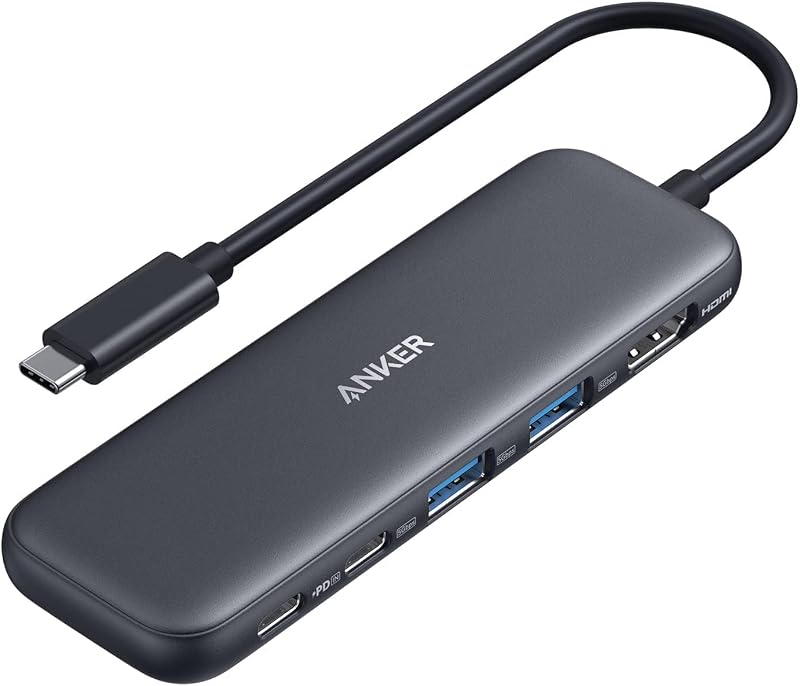
Best for: Mobile creators prioritizing ultralight packing
Pros
- Featherweight 1.44-ounce shell
- 85W pass-through charging
- Pocketable compact design
Cons
- HDMI capped at 4K 30Hz
- No Ethernet or card slots
For mobile video editors prioritizing minimalist transit and bag space, the Anker USB C Hub provides a lightweight connectivity expansion. Engineered as a 5-in-1 portable anker desk hub, this compact unit measures 4.78 inches long, 1.59 inches wide, and a slender 0.45 inches thick, weighing just 1.44 ounces (approximately 40.8 grams). Constructed from durable black acrylonitrile butadiene styrene (ABS) plastic, it slips easily into camera bags, organizer sleeves, or jacket pockets without adding noticeable bulk or weight to travel packs.
Connectivity revolves around core workflow necessities for editing on location. The adapter incorporates one 4K HDMI port, one 5 Gbps USB-C data interface, two 5 Gbps USB-A peripheral ports, and a dedicated 100W USB-C Power Delivery input port. The Power Delivery port supports up to 85W pass-through host charging, reserving roughly 15W to power the hub’s internal hardware and attached accessories while routing the remaining wattage to your laptop. Note that pass-through charging requires connecting an external wall charger, which is not included in the packaging; Anker recommends pairing a 45W charger when powering an iPad. The listing specifies that the 100W PD-IN port does not handle data transfers or audio devices such as USB headphones, and the 5 Gbps USB-C data connection does not carry external video signals.
Visual output through the HDMI port delivers video mirroring or desktop extension up to 4K resolution at 30 Hz to external monitors, studio displays, or hotel televisions. This anker type c adapter interfaces with host machines via USB-C, USB4, or Thunderbolt 3, 4, and 5 ports equipped with DisplayPort Alternate Mode and Power Delivery. Supported operating systems include Windows 7, Windows 10, Windows 11, macOS 12 or newer, and ChromeOS. As with the larger video dock, the listing explicitly notes that this adapter is not compatible with Linux platforms. The package includes the Anker 332 USB-C Hub (5-in-1), an introductory welcome guide, customer support contact options, and an 18-month warranty.
| Color | Black |
|---|---|
| Dimensions | 4.78 x 1.59 x 0.45 Inches |
| Weight | 0.09 Pounds |
Specifications and price are read from the Amazon product listing, not measured by this site. Open the listing
Matching a Model to Your Setup
- Dual-Monitor Color Grading Desks: Choose the Anker Nano 10in1 USB C Hub to drive two high-refresh 2K displays at 240 Hz while running Gigabit Ethernet, external hard drives, and SD card ingest through an organized rear-facing cable layout.
- Heavy Multi-Device Creative Workstations: Select the Anker Prime Charging Station when your daily rig requires 250W of power across multiple production laptops, camera batteries, tablets, and mobile devices without running multiple bulky wall adapters.
- Ultralight Hotel and Coffee Shop Editing: Pack the Anker USB C Hub if your transit priority is featherweight packability, giving you quick 4K HDMI video output, 5 Gbps media transfers, and 85W pass-through laptop charging inside a 1.44-ounce shell.
- Diagnostic-Focused Cable Management: Choose the Anker Nano 10in1 USB C Hub if you want continuous visibility into host charging wattage, port transfer speeds, and operating temperatures alongside a 25-minute productivity timer.
- Fixed Production Studio Power Core: Use the Anker Prime Charging Station as a dedicated base-station power bank where real-time display telemetry and manual dial tuning ensure delicate batteries and high-wattage laptops charge safely at stationary desks.
Before You Buy
Before purchasing any unit from an anker charging station or dock collection, verify the power adapter requirements. The listings for both the Anker Nano 10in1 USB C Hub and the Anker USB C Hub clearly disclose that neither unit includes a wall charger in the box. Both hubs require an external USB-C Power Delivery charging brick plugged into their dedicated PD-IN ports to supply pass-through energy to host machines. The Nano hub supports up to 100W input to deliver 80W of system power, while the 5-in-1 model takes 100W input to route up to 85W of operating power. If you do not already carry an appropriate high-wattage USB-C power supply, you will need to acquire one separately to utilize pass-through laptop charging.
Operating system constraints and port functionality rules also demand close attention. Both the 10-in-1 dock and the 5-in-1 travel hub explicitly state they are incompatible with Linux operating systems. Furthermore, editors working on Apple hardware must note that macOS does not support multi-stream transport (MST) across the dual display outputs of the Nano 10-in-1 hub; dual monitors connected to macOS hosts will render mirrored desktop images rather than separate extended displays. Finally, data ports on both hubs do not carry video signals, and the Anker Prime Charging Station provides no data pass-through or display functionality whatsoever, operating strictly as an AC-powered charging hub with 2.4 GHz Wi-Fi app compatibility.
FAQ
Can the Anker Nano 10in1 USB C Hub extend two different screens on macOS?
No, the product listing explicitly notes that when connected to macOS computers, both external monitors will display identical mirrored content. Driving two independent extended displays requires a compatible Windows 10 or 11 host with a USB-C port supporting DisplayPort 2.1 and DSC 3:1 for maximum refresh rates.
Does the Anker Prime Charging Station output video to an external monitor?
No, the Anker Prime Charging Station functions entirely as a 250W GaN power delivery hub. It is equipped with four USB-C charging ports and two USB-A charging ports, but none of these connections support video transmission, DisplayPort Alternate Mode, or peripheral data transfer to host computers.
Why does the Anker USB C Hub require an external power brick for pass-through charging?
The Anker USB C Hub is a bus-powered accessory that draws minimal operating power directly from the host computer to run data lines. To deliver up to 85W of pass-through power back to your laptop, it requires an external USB-C wall charger connected to its 100W PD-IN port, as no power supply is included in the package.
What makes an Anker multi port charger different from a dedicated video docking station?
A multi-port charger like the Anker Prime model is engineered strictly to convert wall current into high-wattage DC power across multiple devices simultaneously. A dedicated anker desktop usb c hub or docking station incorporates internal controller chips to route display video feeds, Ethernet networking, memory card buses, and high-speed data streams between peripherals and a host computer.
Which operating systems are unsupported across these Anker desk hubs?
Product specifications for both the Anker Nano 10in1 USB C Hub and the Anker USB C Hub specifically state that they are not compatible with Linux. Both hubs support Windows and macOS systems, while the 5-in-1 hub also supports ChromeOS. The Anker Prime Charging Station functions across standard USB battery charging standards regardless of operating system, but its companion app requires 2.4 GHz Wi-Fi connectivity.
Side by side
The 3 models above, lined up on the attributes that every one of them publishes, plus the score and listed price for all of them. Scores are out of 10, based on listed specifications and buyer feedback.
| Attribute | 01 Nano 10in1 USB C Hub | 02 Prime Charging Station | 03 USB C Hub |
|---|---|---|---|
| Our scoreout of 10 | 9.0/10 | 8.6/10 | 9.2/10 |
| Color | Iron Gray | Phantom Gray | Black |
| Weight | 0.73 Pounds | 2.34 pounds | 0.09 Pounds |
Attributes that only some of the models publish are left out of this table; they stay in each model’s own spec sheet above.